
HR Analytics Software vs. Excel: Cost, Speed & Accuracy (2026)
Leadership asks for this quarter's attrition rate, and the answer takes an afternoon — someone has to export leave data, export headcount separately, merge the two, and rebuild the pivot table from scratch because the last one was for a different quarter. HR analytics software exists to remove exactly that rebuild cycle. Here's where Excel still does the job, where it breaks down, and how to tell which stage your team is at.
How Each Approach Actually Works
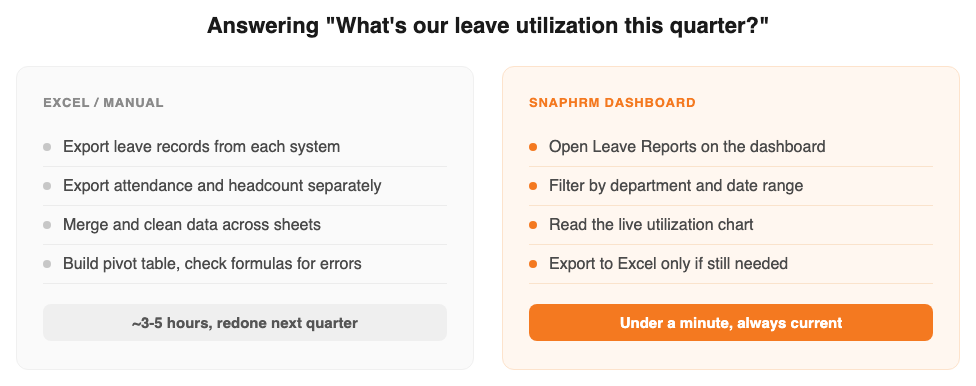
Excel-based HR reporting means exporting data from whichever systems hold it — leave, attendance, payroll, recruiting — then merging those exports by hand into a workbook with formulas and pivot tables someone maintains, usually rebuilt from the last version each time a new question comes in.
HR analytics software replaces the export-and-merge step with a dashboard that reads directly from the system already running leave, attendance, payroll, and hiring — so a report is a filter you apply, not a file you rebuild.
Where Excel Still Works
- Zero software cost — Excel or Google Sheets is already installed, nothing to buy or set up
- Fine for a one-off question — a single ad-hoc report for a small team is manageable by hand
- Total control over layout — build any chart or breakdown the built-in dashboard doesn't offer
- No new tool to learn — whoever already owns the spreadsheet can keep using the skills they have
Where Excel Breaks Down
- Every report starts from an export — leave, attendance, and payroll data has to be pulled from each system before a single formula can run
- Nothing is live — the moment a new leave request or exit is logged, every exported figure is already out of date
- Errors hide in plain sight — a stale export, a range that didn't expand, or a formula copied into the wrong column looks exactly like a correct number
- Rebuilt, not reused — the workbook that answered last quarter's question usually has to be rebuilt, not just refreshed, for this quarter's
- One owner, one bottleneck — if the person who maintains the workbook is out, so is anyone else's ability to answer a workforce question
Side-by-Side Comparison
| Factor | Excel | HR Analytics Software |
|---|---|---|
| Upfront cost | None — already have the spreadsheet | Free up to 5 employees, then a flat plan fee |
| Getting the underlying data | Exported separately from each system | Already in one system, no export step |
| How current the numbers are | Accurate as of the last export | Reads live data, updated in real time |
| Re-running the same report | Rebuilt from the last version each time | Same dashboard, new date range or filter |
| Error risk | Stale exports and formula mistakes look like correct numbers | Figures come straight from the source records |
| Sharing with leadership | Export the finished workbook, or re-send next time | Dashboard access, plus Excel export if still needed |
Figures above describe typical workflow differences, not a formal time-and-motion study — your own report volume and team size will vary.
Signs It's Time to Move Off Excel
Still fine with Excel:
One person owns the workbook, leadership asks for workforce numbers rarely, and no stale or incorrect figure has ever gone out in a report.
Time to switch:
The same report gets requested monthly or more, the data has to come from more than one system, or a formula error has ever reached a number someone acted on.
How SnapHRM Replaces the Spreadsheet Rebuild
SnapHRM's analytics dashboard covers the hand-offs Excel leaves manual: employee, attendance, leave, payroll, and hiring reports all read directly from the same system that already runs leave, attendance, and payroll — so answering a workforce question is a filter, not a rebuild. Every report still exports to Excel on demand, for board decks, finance reconciliation, or compliance filing, so nothing about the format changes — only where the numbers come from. It's included in every plan, free for up to 5 employees, with no separate analytics add-on fee. See our HR analytics software cost and ROI guide for the full pricing breakdown and the metrics worth tracking first.
Stop Rebuilding the Same Report
Employee, attendance, leave, payroll, and hiring reports — read live from one system, exportable to Excel whenever you still need it. Free for up to 5 employees, with a self-hosted Pro option for teams that prefer a one-time payment.
Try SnapHRM FreeRelated Articles
Salary Slip Format in India: Components, Free Template & How to Generate Payslips Payroll · 8 min read Leave Policy in India 2026: Types of Leave, Rules & Free Policy Template Compliance · 10 min read Offer Letter Format in India: Free Templates & Complete Guide (2026) Recruitment · 7 min read Employee Onboarding Checklist for Indian Companies: Step-by-Step Guide (2026) HR Management · 9 min read Employee Self-Service Portal: Benefits, Cost & ROI for Small Businesses (2026) HR Management · 9 min read Applicant Tracking System (ATS): Cost, Benefits & ROI for Small Businesses (2026) Recruitment · 8 min read Biometric vs Software-Based Attendance Tracking: Which Is Better for Small Business? (2026) HR Management · 8 min read Expense Management Software: Cost & ROI for Small Businesses (2026) HR Management · 8 min read HR Analytics Software: Cost & ROI for Small Businesses (2026) HR Management · 8 min read Asset Management Software: Cost & ROI for Small Businesses (2026) HR Management · 8 min read Asset Management Software vs. Spreadsheets (2026) HR Management · 8 min read Leave Management Software: Cost & ROI for Small Businesses (2026) HR Management · 8 min read Document Management Platforms: Cost & ROI for Small Business (2026) HR Management · 8 min read Best Payroll Software in India 2026: Top 8 Tools Compared Payroll · 15 min read Mandatory HR Policies in India 2026 With Latest Amendments Compliance · 12 min read Best HR Software for US Businesses in 2026: Top 8 Compared HR Software · 12 min read US Labor Law Compliance Guide for Small Businesses (2026) Compliance · 15 min read Best HR Software for Singapore Businesses in 2026: Top 8 Compared HR Software · 12 min read Singapore Employment Act Guide for SMBs: Complete Overview (2026) Compliance · 14 min read Attendance Management Software: Cost & ROI for Small Businesses (2026) HR Management · 8 min read Employee Onboarding Software: Cost & ROI for Small Businesses (2026) HR Management · 8 min read Relieving Letter Format India: Free Templates & Guide (2026) HR Management · 7 min read Appointment Letter Format India: Free Template & Sample (2026) Recruitment · 8 min read Experience Letter Format India: Free Template & Sample (2026) HR Management · 7 min read Salary Certificate Format India: Free Template & Sample (2026) Payroll · 7 min read Applicant Tracking System Checklist: How to Choose the Right ATS (2026) Recruitment · 8 min read Confirmation Letter Format India: Free Template & Sample (2026) HR Management · 7 min read Expense Management Software vs. Spreadsheets (2026) HR Management · 8 min read Termination Letter Format India: Free Template & Notice Rules (2026) HR Management · 8 min read Payroll Software vs Excel: Cost, Compliance & Errors (2026) Payroll · 8 min read Leave Management Software vs. Spreadsheets (2026) HR Management · 8 min read Expense Management Software Checklist: How to Choose (2026) HR Management · 8 min read Attendance Management Software Checklist: How to Choose (2026) HR Management · 8 min read Applicant Tracking System vs. Spreadsheets (2026) HR Management · 8 min readFree HR Tools
Frequently Asked Questions
Can a small business just use Excel for HR reporting?
What's wrong with building HR reports in Excel?
When should a small business switch from Excel to an HR analytics dashboard?
Does an HR analytics dashboard replace Excel completely?
Is SnapHRM's HR analytics dashboard free to try instead of Excel?
Why do HR reports in Excel go wrong so often?
Answer Workforce Questions Without Rebuilding a Spreadsheet
Live reports across employees, attendance, leave, payroll, and hiring — exportable to Excel whenever you need it. Free for teams up to 5 employees.