
A new laptop gets ordered because the one issued to an employee who left last quarter can't be found — one tab of the spreadsheet says it was returned, another says it's still with IT for repair, and nobody's sure which row is current. Asset management software exists to remove exactly that ambiguity. Here's what a spreadsheet actually handles well, where it breaks down, and how to tell which stage your team is at.
How Each Approach Actually Works
Spreadsheet asset tracking means one file with a row per laptop, phone, or access card, a status column someone updates when they remember to, and a second, separate lookup — usually a person's memory — to work out who currently has which item.
Asset management software replaces both of those with a single register: each asset is added once with its type and serial number, assigned to an employee with an issue date, and shows up directly on that employee's profile — so "who has this laptop" is a lookup, not an investigation.
Where a Spreadsheet Still Works
- Zero software cost — a spreadsheet is already installed, nothing to buy or set up
- Fine for a short list — a handful of laptops with one owner keeping the file updated is manageable by hand
- Total control over layout — add a column or a category any time, no admin settings to find
- No handoff problem if only one person ever touches it — a single owner who updates it consistently can keep it accurate
Where a Spreadsheet Breaks Down
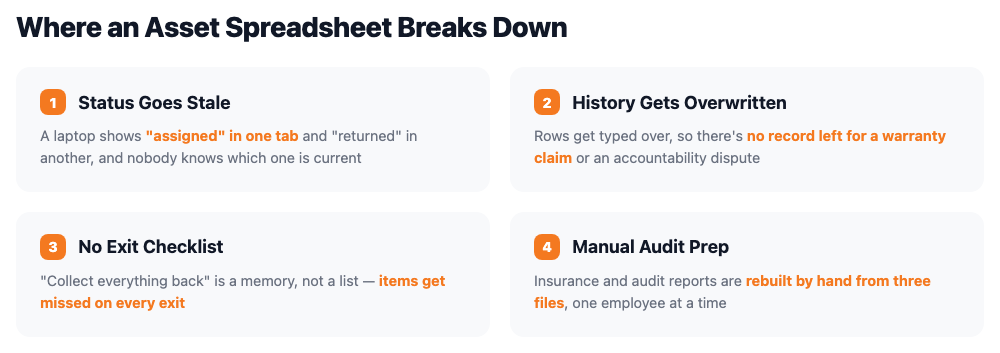
- Status drifts out of date — nothing forces the status column to be updated the moment an item is issued, repaired, or returned
- Assignment history disappears — a row gets overwritten the next time an asset changes hands, so there's no record left for a warranty claim
- No link to offboarding — "collect everything back" during an exit relies on someone remembering to check the sheet, not a generated checklist
- Multiple owners cause conflicts — if IT and HR both maintain a copy, the two lists stop agreeing within a month
- Audit and insurance reports are manual — pulling "everything assigned to this employee" or "everything under repair" means filtering the sheet by hand each time
Side-by-Side Comparison
| Factor | Spreadsheet | Asset Management Software |
|---|---|---|
| Upfront cost | None — already have the file | Free up to 5 employees, then a flat plan fee |
| Who has what, right now | Accurate only if the status column was updated | Shown directly on the employee's profile |
| Assignment history | Usually overwritten, not kept | Full history retained per asset automatically |
| Offboarding checklist | Manual cross-check against the sheet | Auto-generated from assigned assets |
| Multiple editors | Version conflicts between IT and HR copies | Single shared record, no conflicts |
| Audit & insurance reports | Filtered and rebuilt by hand each time | Exportable by employee, type, or status |
Figures above describe typical workflow differences, not a formal cost study — your own team size and asset list will vary.
Signs It's Time to Move Off the Spreadsheet
Still fine with a spreadsheet:
One person owns the file, the asset list is short, and no one has ever had to guess whether an item was actually returned.
Time to switch:
An asset's status has ever been genuinely unclear, an exit has ever been delayed over unreturned equipment, or more than one person now updates the register.
How SnapHRM Replaces the Spreadsheet
SnapHRM's asset management module covers the handoffs a spreadsheet leaves manual: assets are added once to a central register, assigned to an employee with an issue date, and shown directly on that employee's profile — visible to both HR and the employee through self-service. When someone exits, their assigned assets become the return checklist automatically, and reports export to Excel for audits or insurance on demand. It's included in every plan, free for up to 5 employees, with no separate per-asset fee. See our asset management software cost and ROI guide for the full pricing breakdown.
Retire the Asset Spreadsheet
One register, assigned to employees, with an automatic offboarding checklist. Free for up to 5 employees, with a self-hosted Pro option for teams that prefer a one-time payment.
Try SnapHRM FreeRelated Articles
Salary Slip Format in India: Components, Free Template & How to Generate Payslips Payroll · 8 min read Leave Policy in India 2026: Types of Leave, Rules & Free Policy Template Compliance · 10 min read Offer Letter Format in India: Free Templates & Complete Guide (2026) Recruitment · 7 min read Employee Onboarding Checklist for Indian Companies: Step-by-Step Guide (2026) HR Management · 9 min read Employee Self-Service Portal: Benefits, Cost & ROI for Small Businesses (2026) HR Management · 9 min read Applicant Tracking System (ATS): Cost, Benefits & ROI for Small Businesses (2026) Recruitment · 8 min read Biometric vs Software-Based Attendance Tracking: Which Is Better for Small Business? (2026) HR Management · 8 min read Expense Management Software: Cost & ROI for Small Businesses (2026) HR Management · 8 min read HR Analytics Software: Cost & ROI for Small Businesses (2026) HR Management · 8 min read Asset Management Software: Cost & ROI for Small Businesses (2026) HR Management · 8 min read Leave Management Software: Cost & ROI for Small Businesses (2026) HR Management · 8 min read Document Management Platforms: Cost & ROI for Small Business (2026) HR Management · 8 min read Best Payroll Software in India 2026: Top 8 Tools Compared Payroll · 15 min read Mandatory HR Policies in India 2026: Labour Code Amendments Compliance · 12 min read Best HR Software for US Businesses in 2026: Top 8 Compared HR Software · 12 min read US Labor Law Compliance Guide for Small Businesses (2026) Compliance · 15 min read Best HR Software for Singapore Businesses in 2026: Top 8 Compared HR Software · 12 min read Singapore Employment Act Guide for SMBs: Complete Overview (2026) Compliance · 14 min read Attendance Management Software: Cost & ROI for Small Businesses (2026) HR Management · 8 min read Employee Onboarding Software: Cost & ROI for Small Businesses (2026) HR Management · 8 min read Relieving Letter Format India: Free Templates & Guide (2026) HR Management · 7 min read Appointment Letter Format India: Free Template & Sample (2026) Recruitment · 8 min read Experience Letter Format India: Free Template & Sample (2026) HR Management · 7 min read Salary Certificate Format India: Free Template & Sample (2026) Payroll · 7 min read Applicant Tracking System Checklist: How to Choose the Right ATS (2026) Recruitment · 8 min read Confirmation Letter Format India: Free Template & Sample (2026) HR Management · 7 min read Expense Management Software vs. Spreadsheets (2026) HR Management · 8 min read Termination Letter Format India: Free Template & Notice Rules (2026) HR Management · 8 min read Payroll Software vs Excel: Cost, Compliance & Errors (2026) Payroll · 8 min read Leave Management Software vs. Spreadsheets (2026) HR Management · 8 min read Expense Management Software Checklist: How to Choose (2026) HR Management · 8 min read Attendance Management Software Checklist: How to Choose (2026) HR Management · 8 min readFree HR Tools
Frequently Asked Questions
Can a small business just use a spreadsheet for asset tracking?
What's wrong with tracking assets in Excel?
When should a small business switch from Excel to asset tracking software?
Does asset tracking software keep a history of who had each item?
Does asset tracking software replace the spreadsheet completely?
Is SnapHRM's asset tracking free to try instead of a spreadsheet?
Know Where Every Company Asset Is
Add, assign, and recover assets — with an automatic offboarding checklist. Free for teams up to 5 employees.