
Two roles open at once, and the spreadsheet tracking candidates for both has three different people updating it by memory — one tab says a candidate was rejected, another still shows them "awaiting interview." Applicant tracking system software exists to remove exactly that kind of drift. Here's what a spreadsheet actually handles well, where it breaks down, and how to tell which stage your hiring is at.
How Each Approach Actually Works
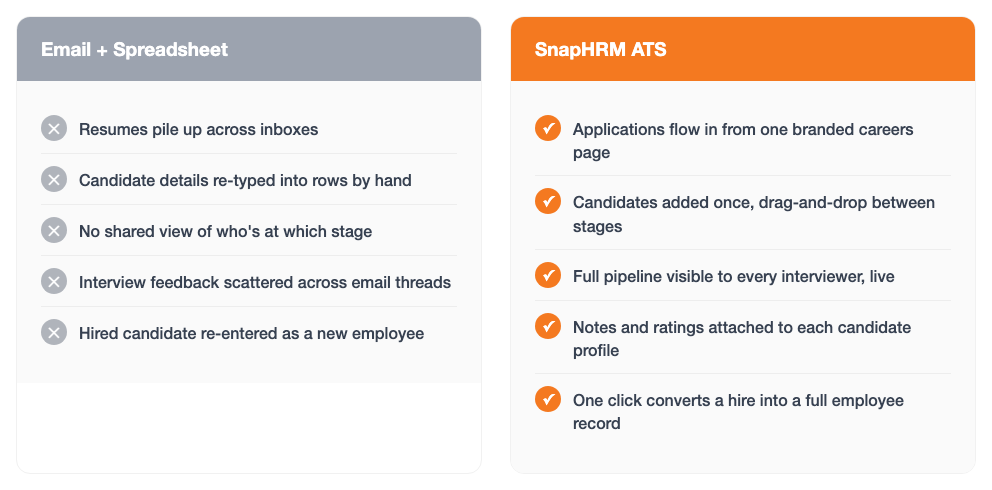
Spreadsheet hiring means resumes land in an email inbox, get copied into a row by hand, and a status column someone updates when they remember to — with a second, separate channel (usually a reply-all email thread) for interview feedback and scheduling.
An applicant tracking system replaces both of those with one pipeline: a candidate applies once through a job posting, shows up directly in a visual pipeline with their current stage, and keeps every note and interviewer's feedback attached to their own profile — so "who's left to interview this week" is a glance, not a search through email.
Where a Spreadsheet Still Works
- Zero software cost — a spreadsheet is already installed, nothing to buy or set up
- Fine for one role at a time — a single opening with a handful of applicants and one person reviewing them is manageable by hand
- Total control over layout — add a column or re-sort candidates any time, no settings to find
- No handoff problem if only one person ever hires — a solo founder or single hiring manager who updates it consistently can keep it accurate
Where a Spreadsheet Breaks Down
- Resumes pile up across inboxes — nothing routes an application into the sheet automatically, so someone has to notice it and copy it over
- Stage tracking drifts out of date — nothing forces the status column to be updated the moment a candidate is screened, interviewed, or rejected
- Interview feedback scatters — notes from different interviewers end up in separate emails or chat threads instead of attached to the candidate
- Multiple open roles multiply the mess — a second or third hiring manager working from their own copy stops matching the original within days
- Hiring means starting over — a candidate's resume, notes, and history don't carry into onboarding; someone re-types their details as a new employee
Side-by-Side Comparison
| Factor | Spreadsheet | Applicant Tracking System |
|---|---|---|
| Upfront cost | None — already have the file | Free up to 5 employees, then a flat plan fee |
| Where applications land | Email inbox, copied in by hand | A branded careers page, straight into the pipeline |
| Pipeline visibility | Accurate only if the status column was updated | Live drag-and-drop view, visible to every interviewer |
| Interview feedback | Scattered across email or chat threads | Notes and ratings attached to the candidate profile |
| Multiple open roles | Separate tabs or copies drift out of sync | Each opening has its own pipeline in one system |
| Hiring a candidate | Details re-typed into onboarding from scratch | One click converts the candidate into an employee |
Figures above describe typical workflow differences, not a formal study — your own hiring volume will vary.
Signs It's Time to Move Off the Spreadsheet
Still fine with a spreadsheet:
One role open at a time, one person reviewing candidates, and nobody has ever lost track of who was already interviewed.
Time to switch:
Two or more roles are open together, more than one person needs to see candidate status, or interview feedback has ever gone missing in someone's inbox.
How SnapHRM Replaces the Spreadsheet
SnapHRM's applicant tracking system covers the handoffs a spreadsheet leaves manual: a branded careers page collects applications directly into a drag-and-drop pipeline, every interviewer can add notes and ratings to a candidate's own profile, and open positions each get their own pipeline instead of a separate tab per role. When a candidate is hired, converting them into a full employee record is one click — no re-typing their details into onboarding. It's included in every plan, free for up to 5 employees, with no separate per-opening fee. See our ATS cost and ROI guide for the full pricing breakdown, or the applicant tracking system checklist for what to look for before you buy.
Retire the Hiring Spreadsheet
One pipeline, shared across every interviewer, with one-click candidate-to-employee conversion. Free for up to 5 employees, with a self-hosted Pro option for teams that prefer a one-time payment.
Try SnapHRM FreeRelated Articles
Salary Slip Format in India: Components, Free Template & How to Generate Payslips Payroll · 8 min read Leave Policy in India 2026: Types of Leave, Rules & Free Policy Template Compliance · 10 min read Offer Letter Format in India: Free Templates & Complete Guide (2026) Recruitment · 7 min read Employee Onboarding Checklist for Indian Companies: Step-by-Step Guide (2026) HR Management · 9 min read Employee Self-Service Portal: Benefits, Cost & ROI for Small Businesses (2026) HR Management · 9 min read Applicant Tracking System (ATS): Cost, Benefits & ROI for Small Businesses (2026) Recruitment · 8 min read Biometric vs Software-Based Attendance Tracking: Which Is Better for Small Business? (2026) HR Management · 8 min read Expense Management Software: Cost & ROI for Small Businesses (2026) HR Management · 8 min read HR Analytics Software: Cost & ROI for Small Businesses (2026) HR Management · 8 min read HR Analytics Software vs. Excel: Cost, Speed & Accuracy (2026) HR Management · 8 min read Asset Management Software: Cost & ROI for Small Businesses (2026) HR Management · 8 min read Asset Management Software vs. Spreadsheets (2026) HR Management · 8 min read Leave Management Software: Cost & ROI for Small Businesses (2026) HR Management · 8 min read Document Management Platforms: Cost & ROI for Small Business (2026) HR Management · 8 min read Best Payroll Software in India 2026: Top 8 Tools Compared Payroll · 15 min read Mandatory HR Policies in India 2026 With Latest Amendments Compliance · 12 min read Best HR Software for US Businesses in 2026: Top 8 Compared HR Software · 12 min read US Labor Law Compliance Guide for Small Businesses (2026) Compliance · 15 min read Best HR Software for Singapore Businesses in 2026: Top 8 Compared HR Software · 12 min read Singapore Employment Act Guide for SMBs: Complete Overview (2026) Compliance · 14 min read Attendance Management Software: Cost & ROI for Small Businesses (2026) HR Management · 8 min read Employee Onboarding Software: Cost & ROI for Small Businesses (2026) HR Management · 8 min read Relieving Letter Format India: Free Templates & Guide (2026) HR Management · 7 min read Appointment Letter Format India: Free Template & Sample (2026) Recruitment · 8 min read Experience Letter Format India: Free Template & Sample (2026) HR Management · 7 min read Salary Certificate Format India: Free Template & Sample (2026) Payroll · 7 min read Applicant Tracking System Checklist: How to Choose the Right ATS (2026) Recruitment · 8 min read Confirmation Letter Format India: Free Template & Sample (2026) HR Management · 7 min read Expense Management Software vs. Spreadsheets (2026) HR Management · 8 min read Termination Letter Format India: Free Template & Notice Rules (2026) HR Management · 8 min read Payroll Software vs Excel: Cost, Compliance & Errors (2026) Payroll · 8 min read Leave Management Software vs. Spreadsheets (2026) HR Management · 8 min read Expense Management Software Checklist: How to Choose (2026) HR Management · 8 min read Attendance Management Software Checklist: How to Choose (2026) HR Management · 8 min readFree HR Tools
Frequently Asked Questions
Can a small business just use a spreadsheet to track candidates?
What's wrong with tracking candidates in Excel or Google Sheets?
When should a small business switch from spreadsheet hiring to an ATS?
Does an applicant tracking system replace the hiring spreadsheet completely?
Can I convert a hired candidate straight into an employee record?
Is SnapHRM's applicant tracking free to try instead of a spreadsheet?
Hire Without the Hiring Spreadsheet
Post jobs, track candidates, and convert hires into employees — all in one pipeline. Free for teams up to 5 employees.