
Most small businesses start payroll the same way: a master Excel sheet with one row per employee, formulas for PF, ESI, and tax deductions, and a payslip built by copying numbers out of it every month. It works — until a statutory rate changes, a formula gets dragged wrong, or two people need to edit the sheet at once. This is where payroll software starts to earn its cost. Here's what Excel still handles fine, where it breaks down, and how to tell which stage your payroll is at.
How Each Approach Actually Works
Excel payroll means one master sheet with a row per employee, formulas that calculate PF, ESI, professional tax, and TDS deductions, and someone manually updating those formulas whenever a statutory rate changes, then copying the final numbers into a payslip template one employee at a time.
Payroll software replaces the formulas with configured statutory rules: PF, ESI, professional tax, and TDS are set up once as settings, applied automatically to every employee, and a rate change means updating one setting instead of hunting down every affected cell. Payslips generate for the entire company in one run instead of being built by hand.
Where Excel Still Works
- Zero software cost — Excel or Google Sheets is already available, nothing to buy or configure
- Total control over the layout — add a column or category any time, no admin panel to learn
- Fine for a handful of employees on stable pay — a very small team with no statutory complexity is easy for one person to keep on top of manually
- No approval bottleneck with one owner — if a single person runs payroll end to end, there's no coordination overhead to worry about
Where Excel Breaks Down
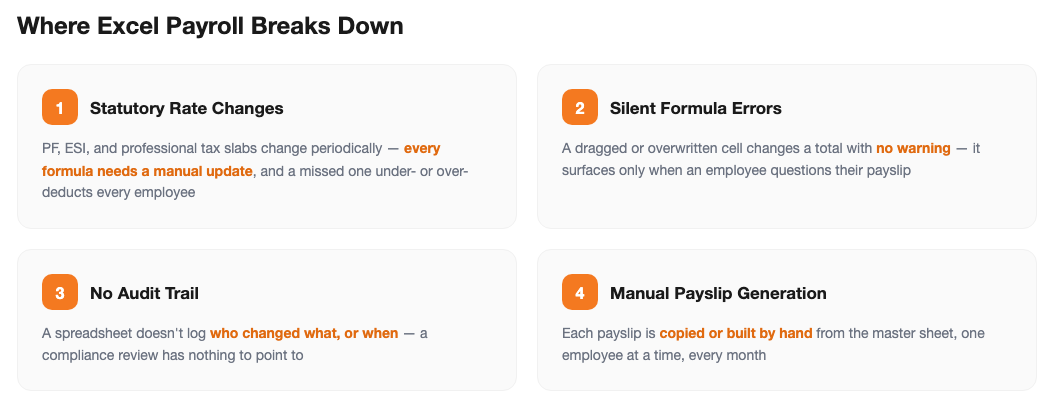
- Statutory rate changes are a manual hunt — PF, ESI, and professional tax slabs are revised periodically, and every formula that references the old rate has to be found and updated by hand
- Formula errors go unnoticed — a dragged or overwritten cell changes a total silently, and nothing flags it until an employee questions their payslip
- No audit trail — a spreadsheet doesn't record who changed a formula or when, which is exactly what a compliance review or an employee dispute asks for
- Payslips are built one at a time — copying numbers into a payslip template for each employee, every month, is where typos creep in
- One file, one owner — once more than one person needs to edit or review payroll at the same time, shared spreadsheets start producing version conflicts
Side-by-Side Comparison
| Factor | Excel | Payroll Software |
|---|---|---|
| Upfront cost | None — already have the file | Free up to 5 employees, then a flat plan fee |
| PF / ESI / PT / TDS updates | Manually edited into every affected formula | Updated once as a setting, applied to every employee |
| Payslip generation | Built or copied by hand, one employee at a time | Generated for the whole company in one run |
| Audit trail | No record of who changed what, or when | Every change and approval logged with a timestamp |
| Multiple simultaneous editors | Prone to version conflicts | Role-based access, no overwritten edits |
Figures above describe typical workflow differences, not a formal cost study — your own headcount and process will vary.
Signs It's Time to Move Off Excel
Still fine with Excel:
A small, stable headcount, one person owns the sheet, and a statutory rate change is rare enough to update by hand without missing a formula.
Time to switch:
A rate change has ever slipped through and reached a payslip, more than one person now touches the sheet, or building payslips is eating a full day every month.
How SnapHRM Replaces the Spreadsheet
SnapHRM's payroll software configures PF, ESI, professional tax, and TDS as settings rather than formulas, so a rate change is a one-time update instead of a search across every employee row. Payroll for the entire company generates in a single click, and every employee gets their payslip automatically through the self-service portal instead of a copy-pasted file. If you want to sanity-check specific numbers before you switch, our TDS calculator, EPF calculator, and ESI calculator use the same current statutory rates. It's included in every plan, free for up to 5 employees, with a self-hosted SnapHRM Pro option for teams that want payroll data on their own servers.
Retire the Payroll Spreadsheet
One-click payroll with PF, ESI, professional tax, and TDS handled as settings — not formulas. Free for up to 5 employees, with a self-hosted Pro option for teams that prefer a one-time payment.
Try SnapHRM FreeRelated Articles
Salary Slip Format in India: Components, Free Template & How to Generate Payslips Payroll · 8 min read Leave Policy in India 2026: Types of Leave, Rules & Free Policy Template Compliance · 10 min read Offer Letter Format in India: Free Templates & Complete Guide (2026) Recruitment · 7 min read Employee Onboarding Checklist for Indian Companies: Step-by-Step Guide (2026) HR Management · 9 min read Employee Self-Service Portal: Benefits, Cost & ROI for Small Businesses (2026) HR Management · 9 min read Applicant Tracking System (ATS): Cost, Benefits & ROI for Small Businesses (2026) Recruitment · 8 min read Biometric vs Software-Based Attendance Tracking: Which Is Better for Small Business? (2026) HR Management · 8 min read Expense Management Software: Cost & ROI for Small Businesses (2026) HR Management · 8 min read HR Analytics Software: Cost & ROI for Small Businesses (2026) HR Management · 8 min read Asset Management Software: Cost & ROI for Small Businesses (2026) HR Management · 8 min read Leave Management Software: Cost & ROI for Small Businesses (2026) HR Management · 8 min read Document Management Platforms: Cost & ROI for Small Business (2026) HR Management · 8 min read Best Payroll Software in India 2026: Top 8 Tools Compared Payroll · 15 min read Mandatory HR Policies in India 2026: Labour Code Amendments Compliance · 12 min read Best HR Software for US Businesses in 2026: Top 8 Compared HR Software · 12 min read US Labor Law Compliance Guide for Small Businesses (2026) Compliance · 15 min read Best HR Software for Singapore Businesses in 2026: Top 8 Compared HR Software · 12 min read Singapore Employment Act Guide for SMBs: Complete Overview (2026) Compliance · 14 min read Attendance Management Software: Cost & ROI for Small Businesses (2026) HR Management · 8 min read Employee Onboarding Software: Cost & ROI for Small Businesses (2026) HR Management · 8 min read Relieving Letter Format India: Free Templates & Guide (2026) HR Management · 7 min read Appointment Letter Format India: Free Template & Sample (2026) Recruitment · 8 min read Experience Letter Format India: Free Template & Sample (2026) HR Management · 7 min read Salary Certificate Format India: Free Template & Sample (2026) Payroll · 7 min read Applicant Tracking System Checklist: How to Choose the Right ATS (2026) Recruitment · 8 min read Confirmation Letter Format India: Free Template & Sample (2026) HR Management · 7 min read Expense Management Software vs. Spreadsheets (2026) HR Management · 8 min read Termination Letter Format India: Free Template & Notice Rules (2026) HR Management · 8 min readFree HR Tools
Frequently Asked Questions
Can a small business just run payroll on Excel?
What's wrong with using Excel for payroll?
How much does payroll software cost compared to running payroll in Excel?
When should a business switch from Excel to payroll software?
Does payroll software handle Indian statutory compliance automatically?
Stop Rebuilding Payroll in Excel Every Month
One-click payroll generation with statutory compliance built in. Free for teams up to 5 employees.