
Leave Management Software for Growing Teams
Track leave balances, automate approvals, manage holidays and comp-offs — all from one dashboard. No more spreadsheet leave trackers.
Still Tracking Leave on Spreadsheets?
Manual leave tracking leads to conflicts, payroll errors, and frustrated employees. Here's what goes wrong.
Leave Conflicts
Two people from the same team approved for the same day. Without visibility into team availability, managers approve leave blindly.
Payroll Mismatches
Leave deductions in payroll don't match actual leave taken. Manual data entry between leave tracker and payroll creates errors every month.
HR Spends Hours Reconciling
At month-end, HR manually cross-checks leave records, adjusts balances, and fixes discrepancies. Time that should go to strategic work.
What is Leave Management Software and Why Do You Need It?
Leave management is one of the first HR processes that breaks when a company grows beyond 5-10 employees. What starts as a simple WhatsApp message to the manager turns into a mess of conflicting approvals, inaccurate leave balances, and payroll errors at month-end.
Most small businesses in India track leave on Google Sheets or Excel. This works until someone takes a leave that was already taken by a teammate, or when month-end payroll calculations don't match the leave records. By the time you have 15-20 employees, manual leave tracking costs you real money in payroll errors and lost productivity.
SnapHRM leave management software replaces spreadsheet-based tracking with a proper system. Employees apply for leave from their dashboard or mobile app. Managers approve or reject with one click. Leave balances update automatically. And when payroll runs, leave data flows directly into salary calculations — no manual reconciliation needed.
Unlike standalone leave trackers, SnapHRM includes leave management as part of a complete HR platform. You get leave tracking alongside attendance management, payroll processing, recruiting, expense management, and more — all in one system. Free for up to 5 employees, with paid plans starting at just ₹499/month.
"Leave management software," "employee leave management system," and "leave tracking system" all describe the same category of tool — one that replaces manual leave tracking with automated balances, approvals, and policy enforcement. A proper employee leave management system also needs to get statutory leave right, not just casual and sick leave: the Maternity Benefit Act, as amended in 2017, entitles eligible employees to 26 weeks of paid maternity leave for the first two children and 12 weeks for any child after that. SnapHRM lets you configure these statutory leave types so entitlements and balances are enforced automatically once set up, instead of tracked by hand in a spreadsheet.
Not sure if it is worth switching from a spreadsheet yet? See our leave management software cost and ROI breakdown for typical pricing and when the switch pays for itself, or our leave management software vs spreadsheets comparison for exactly where a spreadsheet breaks down.
Leave Management That Runs Itself
Employees apply, managers approve, balances update. Payroll picks up leave data automatically.
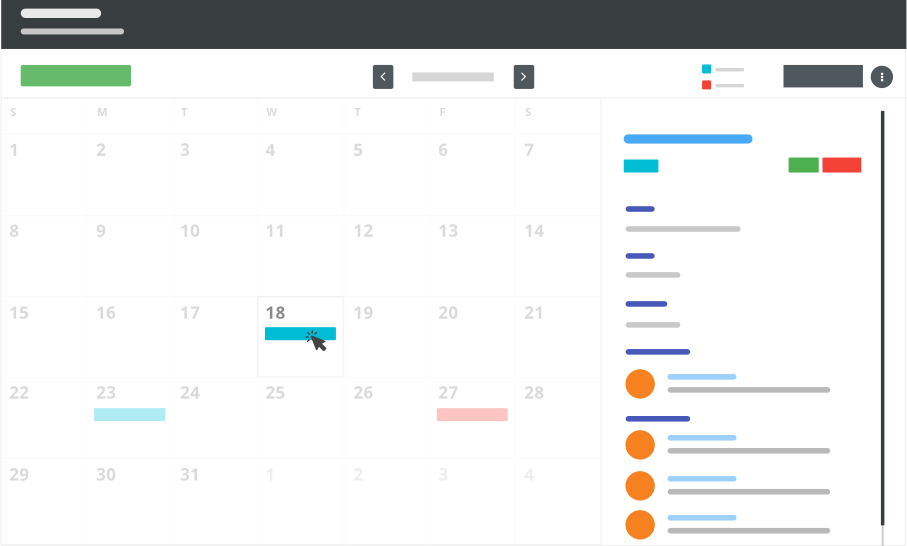
Visual Leave Calendar
See who's on leave, who's available, and plan team schedules at a glance. No more checking with each person individually.
One-Click Approvals
Managers get notified when someone applies for leave. Approve or reject from the dashboard, email, or mobile app.
Auto Balance Updates
Leave balances update instantly after approval. Employees always see their current balance — no month-end surprises.
How SnapHRM Leave Management Works
Three steps to automated leave tracking
Configure Leave Policies
Set up leave types (casual, sick, earned, comp-off), accrual rules, carry-forward limits, and approval hierarchies. Configure once per company.
Employees Apply Online
Employees apply for leave from their dashboard or mobile app. They see their balance, team calendar, and can select dates with one click.
Approve & Auto-Sync
Managers approve or reject. Balances update automatically. Leave data flows into attendance and payroll — zero manual data entry.
Everything You Need for Leave Management
All leave features included in every plan — no add-ons
Multiple Leave Types
Casual leave, sick leave, earned leave, comp-off, maternity, paternity, and custom leave types. Define as many as your policy requires.
Holiday Calendar
Configure company holidays, optional holidays, and location-specific holidays. Employees see the full holiday list on their dashboard.
Team Leave View
Managers see their team's leave calendar before approving. Prevent conflicts where multiple team members are off on the same day.
Carry Forward & Encashment
Configure carry-forward limits and leave encashment policies. Unused leave can roll over to the next year or be paid out.
Mobile Leave Application
Employees apply for leave from the mobile app. Managers approve on the go. No need to be at a desktop.
Payroll Integration
Leave data automatically flows into payroll. Loss-of-pay leaves are deducted from salary without manual calculation.
Statutory Leave Compliance
Configure maternity, paternity, and other statutory leave types to match Indian labor law — including the Maternity Benefit Act's 26-week entitlement for the first two children — so eligibility and balances are enforced automatically.
Why Not Just a Leave Tracker?
Standalone leave tracking tools solve one problem. SnapHRM solves them all.
| What You Need | SnapHRM | Leave-Only Tools |
|---|---|---|
| Leave Tracking & Approvals | ||
| Multiple Leave Types & Policies | ||
| Holiday Calendar | ||
| Attendance Integration | ||
| Payroll Integration | ||
| Statutory Leave Compliance | ||
| Employee Database | ||
| Recruiting & Onboarding | ||
| Expense Management | ||
| Document Management | ||
| Free Plan Available |
Simple, Transparent Pricing
Leave Management is included in every plan. No per-feature charges. No surprises.
Free for up to 5 employees
Full leave management + all HR features. No credit card required.
Paid plans for growing teams:
- Basic (10 employees) — $8/mo or ₹499/mo
- Standard (25 employees) — $24/mo or ₹1,490/mo
- Premium (50 employees) — $39/mo or ₹2,490/mo
- Enterprise (100 employees) — $59/mo or ₹3,990/mo
Related Features
Leave Management works best with these SnapHRM features
Frequently Asked Questions
Common questions about SnapHRM leave management
What is leave management software?
How does SnapHRM leave management work?
What leave types does SnapHRM support?
Is SnapHRM leave management free?
Does leave data sync with payroll?
Can employees apply for leave from their phone?
How does SnapHRM prevent leave conflicts?
Can I configure different leave policies for different departments?
Is an "employee leave management system" different from leave management software?
Does SnapHRM's leave management system handle statutory leave like maternity leave?
Is there a one-time-purchase leave management system instead of a monthly subscription?
Have more questions? Check our documentation or contact us.
Stop Tracking Leave on Spreadsheets
Free for up to 5 employees. Set up in minutes. No credit card required.