
Payroll Software Features Checklist: What to Actually Look For (2026)
Every payroll software pricing page lists dozens of features as if they're all essential. Most aren't, for a small business running one or two payroll cycles a month. This checklist strips it down to what actually matters when choosing payroll software: the features worth insisting on, the ones you can skip, the red flags that mean walk away, and the questions to ask before you sign up.
The Must-Have Features Checklist
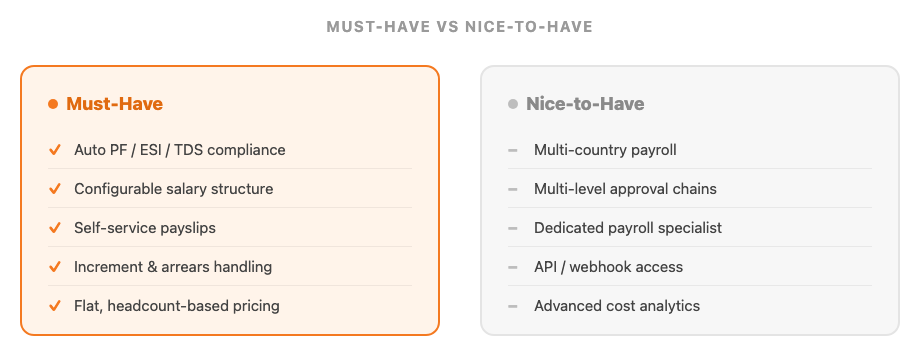
If a tool is missing any of these, it isn't really replacing a payroll spreadsheet — it's just a faster calculator:
| Feature | Why It Matters | Red Flag If Missing |
|---|---|---|
| Automatic PF, ESI, TDS & PT compliance | Statutory deductions should calculate from configured salary components, at current rates, not a manual formula | You have to edit a tax slab or rate yourself when the law changes |
| Configurable salary structure | Basic pay, HRA, allowances, and custom components, set once per employee or per group | Only one fixed salary template for the whole company |
| Auto-generated payslips with self-service access | Employees should view and download their own payslips instead of emailing HR for a copy | Payslips are a manually created PDF or Word document each month |
| Increment & arrears handling | A salary revision mid-cycle should flow into the next run with arrears calculated automatically | Every salary change means manually rebuilding that employee's structure |
| Flat, headcount-based pricing | Payroll shouldn't carry a per-payslip or per-run charge on top of your base subscription | A separate invoice line for "payroll processing" each time you run it |
Past these five, most remaining "features" on a vendor's list are nice-to-haves, not deal-breakers — see the next section.
Nice-to-Have Features You Can Skip (For Now)
These show up on almost every payroll software pricing page, and they're genuinely useful at scale — but they rarely change the outcome of a normal monthly payroll run for a small team, and are often what pushes a plan into a higher, enterprise-priced tier:
- Multi-country or multi-currency payroll — built for companies running payroll across several jurisdictions at once; most small Indian businesses need one country's compliance done correctly, not five done adequately
- Elaborate multi-level approval hierarchies — useful once payroll passes through several reviewers before release; a small team usually has one person who reviews and approves
- Dedicated payroll specialist or managed service — valuable if you want to outsource the work entirely; adds ongoing cost that a self-serve tool with good defaults can often replace
- API/webhook access for custom integrations — matters if you're building your own tooling around payroll data; most small teams just need it to reach their accountant or statutory filings, which export already covers
- Advanced workforce cost analytics dashboards — useful across departments at a larger company; a basic monthly cost report is usually enough to spot drift at a small one
Red Flags That Mean Walk Away
- No published pricing — "contact sales" on every plan usually means the price is set by how much a salesperson thinks you'll pay
- Statutory rates you have to update yourself — defeats the point of automating compliance in the first place
- Per-payslip or per-run fees — stacked on top of a base subscription, these add up fast as headcount or cycle frequency grows
- No data export — if you can't take your payroll history with you, switching tools later means starting from zero
- No free trial or free tier — you can't judge whether salary structures and compliance rules actually fit your business without running a real cycle through it
Questions to Ask Before You Buy
Save these for the sales call or the FAQ page — the answers usually reveal more than the feature list does:
- "When PF, ESI, or TDS rates change, do you update them, or do we?"
- "If we revise someone's salary mid-cycle, does the next payroll run calculate arrears automatically?"
- "Does attendance and leave data reach payroll automatically, or is there still a manual export step?"
- "Does the price change as we add employees, or run an extra off-cycle payroll?"
- "Can I export our full payroll history if we decide to switch tools later?"
Standalone Payroll Software vs. Built Into Your HR Platform
The must-have checklist above applies either way — but where the tool lives changes how much reconciliation work is left before you can run payroll:
| Standalone Payroll Tool | Payroll Built Into HR Platform | |
|---|---|---|
| Attendance & leave data | Exported from a separate system and re-keyed or re-imported | Flows into payroll directly, no export step |
| Employee records | Duplicated between payroll and your HR system | One employee profile, shared across modules |
| Pricing | Separate subscription, often with per-run fees | Included in your existing HR plan |
| Best fit | Payroll is your only software need right now | You also need leave, attendance, or HR records |
How SnapHRM Checks These Boxes
SnapHRM's payroll software covers the must-have list directly: configurable salary components (basic, HRA, allowances, and custom), automatic PF, ESI, TDS, and professional tax calculation, auto-generated payslips employees can view from their own self-service login, and salary revisions, increments, and promotions with automatic arrear calculations — see our increment letter format guide if you're issuing one this appraisal cycle. Attendance and leave data reach payroll without a manual export, reimbursement claims are pulled into the same payroll run once approved, and you can export payroll data and compliance reports to Excel at any time. Pricing is flat per employee headcount with no per-payslip charge, and it's free for up to 5 employees, with a self-hosted SnapHRM Pro option for teams that want payroll data on their own servers. Still running the numbers by hand? See our payroll software vs Excel comparison for where spreadsheet formulas typically break down.
Try a Checklist-Ready Payroll System
SnapHRM includes payroll, compliance, attendance, and leave in every plan, with a self-hosted Pro option for teams that prefer a one-time payment. Free for up to 5 employees.
Try SnapHRM FreeRelated Articles
Salary Slip Format in India: Components, Free Template & How to Generate Payslips Payroll · 8 min read Leave Policy in India 2026: Types of Leave, Rules & Free Policy Template Compliance · 10 min read Offer Letter Format in India: Free Templates & Complete Guide (2026) Recruitment · 7 min read Employee Onboarding Checklist for Indian Companies: Step-by-Step Guide (2026) HR Management · 9 min read Employee Self-Service Portal: Benefits, Cost & ROI for Small Businesses (2026) HR Management · 9 min read Applicant Tracking System (ATS): Cost, Benefits & ROI for Small Businesses (2026) Recruitment · 8 min read Biometric vs Software-Based Attendance Tracking: Which Is Better for Small Business? (2026) HR Management · 8 min read Expense Management Software: Cost & ROI for Small Businesses (2026) HR Management · 8 min read HR Analytics Software: Cost & ROI for Small Businesses (2026) HR Management · 8 min read HR Analytics Software vs. Excel: Cost, Speed & Accuracy (2026) HR Management · 8 min read Asset Management Software: Cost & ROI for Small Businesses (2026) HR Management · 8 min read Asset Management Software vs. Spreadsheets (2026) HR Management · 8 min read Leave Management Software: Cost & ROI for Small Businesses (2026) HR Management · 8 min read Document Management Platforms: Cost & ROI for Small Business (2026) HR Management · 8 min read Best Payroll Software in India 2026: Top 8 Tools Compared Payroll · 15 min read Mandatory HR Policies in India 2026 With Latest Amendments Compliance · 12 min read Best HR Software for US Businesses in 2026: Top 8 Compared HR Software · 12 min read US Labor Law Compliance Guide for Small Businesses (2026) Compliance · 15 min read Best HR Software for Singapore Businesses in 2026: Top 8 Compared HR Software · 12 min read Singapore Employment Act Guide for SMBs: Complete Overview (2026) Compliance · 14 min read Attendance Management Software: Cost & ROI for Small Businesses (2026) HR Management · 8 min read Employee Onboarding Software: Cost & ROI for Small Businesses (2026) HR Management · 8 min read Relieving Letter Format India: Free Templates & Guide (2026) HR Management · 7 min read Appointment Letter Format India: Free Template & Sample (2026) Recruitment · 8 min read Experience Letter Format India: Free Template & Sample (2026) HR Management · 7 min read Salary Certificate Format India: Free Template & Sample (2026) Payroll · 7 min read Applicant Tracking System Checklist: How to Choose the Right ATS (2026) Recruitment · 8 min read Confirmation Letter Format India: Free Template & Sample (2026) HR Management · 7 min read Expense Management Software vs. Spreadsheets (2026) HR Management · 8 min read Termination Letter Format India: Free Template & Notice Rules (2026) HR Management · 8 min read Payroll Software vs Excel: Cost, Compliance & Errors (2026) Payroll · 8 min read Leave Management Software vs. Spreadsheets (2026) HR Management · 8 min read Expense Management Software Checklist: How to Choose (2026) HR Management · 8 min read Attendance Management Software Checklist: How to Choose (2026) HR Management · 8 min read Applicant Tracking System vs. Spreadsheets (2026) HR Management · 8 min read Increment Letter Format India: Free Template & Sample (2026) Payroll · 7 min readFree HR Tools
Frequently Asked Questions
What features should I look for in payroll software for a small business?
What are red flags when evaluating payroll software?
Does payroll software handle PF, ESI, and TDS automatically?
Should I choose standalone payroll software or one built into my HR platform?
What questions should I ask a payroll software vendor before signing up?
Is there free payroll software for small businesses in India?
Payroll With Nothing Left to Reconcile
Statutory compliance, payslips, and increments — all automatic. Free for teams up to 5 employees.