
HR Analytics & Reporting Dashboard
See employee headcount, attendance trends, leave summaries, payroll costs, and hiring pipeline — all on one dashboard. Data-driven HR decisions for growing teams.
Flying Blind on HR Decisions?
Without HR data in one place, every question requires manual research.
Data Scattered Across Tools
Leave data in one spreadsheet, attendance in a biometric system, payroll in another tool. Getting a unified picture requires manual stitching every time.
No Answers to Simple Questions
"What is our attrition rate?" "How many people were hired this quarter?" Questions that should take seconds require hours of data collection.
Reactive Instead of Proactive
By the time you notice a trend — high absenteeism, rising payroll costs, slow hiring — the problem has already impacted the business.
What is HR Analytics & Reporting Software and Why Do You Need It?
Most small businesses make HR decisions based on gut feeling because the data is scattered across spreadsheets, emails, and disconnected tools. How many employees joined this quarter? What is the average leave utilization? Which department has the highest absenteeism? How much did payroll cost this month compared to last? These questions should have instant answers — but without a centralized system, answering them requires hours of manual data collection.
SnapHRM analytics gives you a dashboard with real-time HR metrics. Because all your HR data — leave, attendance, payroll, recruiting, expenses — lives in one system, the reports are always accurate and up to date. No manual data stitching.
Export any report to Excel for deeper analysis or to share with leadership. The dashboard is available to admins and HR managers with role-based access control.
Free for up to 5 employees. Reports and analytics included in every plan. See the full cost and ROI breakdown, including which HR metrics are actually worth tracking, to decide if it is worth it for your team size. Still building reports by exporting from each system into a workbook? Our HR analytics software vs. Excel comparison covers exactly where that still works and the signs it is time to switch.
Your HR Data, at a Glance
Real-time dashboard with metrics that matter. No data collection needed — it is all already in SnapHRM.
Employee Overview
Total headcount, department breakdown, new hires, exits, and growth trends. See your workforce composition at a glance.
Attendance & Leave Insights
Attendance percentage, late arrival trends, leave utilization by type and department. Spot patterns before they become problems.
Payroll & Expense Summaries
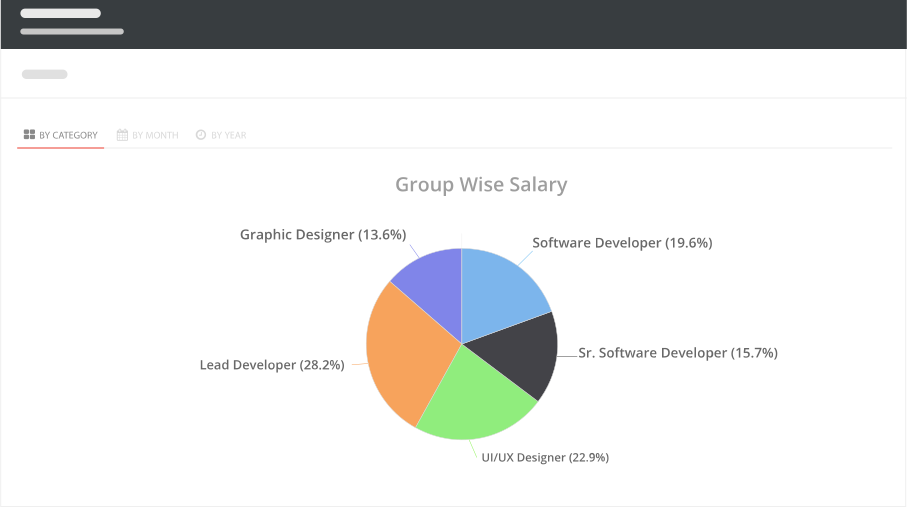
Monthly payroll costs, department-wise salary distribution, expense trends. Budget tracking without spreadsheets.
How SnapHRM Analytics Works
Data flows in automatically — you just read the dashboard
Use SnapHRM for Your HR
As your team uses SnapHRM for leave, attendance, payroll, recruiting, and expenses — data accumulates automatically. No separate data entry.
View the Dashboard
Open the analytics dashboard to see real-time metrics — headcount, attendance trends, leave summaries, payroll costs, and hiring pipeline status.
Export & Share
Export any report to Excel. Share with leadership, finance, or auditors. Use the data to make informed HR decisions.
Reports That Write Themselves
Every report is generated from data already in SnapHRM — no manual input needed
Employee Reports
Headcount, department distribution, joining and exit trends, tenure analysis. Filter by date range, department, or location.
Attendance Reports
Daily, weekly, and monthly attendance summaries. Late arrival patterns, absent days, overtime hours by employee or department.
Leave Reports
Leave utilization by type, department, and employee. Carry-forward balances, encashment data, and leave trend analysis.
Payroll Reports
Monthly payroll summary, department-wise salary distribution, statutory deduction reports (PF, ESI, TDS, PT), and year-over-year cost trends.
Hiring Reports
Open positions, candidates per stage, time-to-hire, offer acceptance rate. Track your recruiting pipeline efficiency.
Excel Export
Every report can be exported to Excel for deeper analysis, sharing with leadership, or compliance filing.
Analytics Built Into Your HR Data
Standalone BI tools need data imports. SnapHRM reports use data that is already there.
| What You Need | SnapHRM | Standalone BI Tools |
|---|---|---|
| HR Dashboard | ||
| Custom Reports | ||
| Excel Export | ||
| No Data Import Needed | ||
| Real-Time HR Data | ||
| Leave & Attendance Reports | ||
| Payroll Reports | ||
| Hiring Pipeline Reports | ||
| No Extra Subscription | ||
| Free Plan Available |
Simple, Transparent Pricing
HR Analytics & Reporting is included in every plan. No per-feature charges. No surprises.
Free for up to 5 employees
Full hr analytics & reporting + all HR features. No credit card required.
Paid plans for growing teams:
- Basic (10 employees) — $8/mo or ₹499/mo
- Standard (25 employees) — $24/mo or ₹1,490/mo
- Premium (50 employees) — $39/mo or ₹2,490/mo
- Enterprise (100 employees) — $59/mo or ₹3,990/mo
Related Features
HR Analytics & Reporting works best with these SnapHRM features
Frequently Asked Questions
Common questions about SnapHRM hr analytics & reporting
What is HR analytics software?
Is SnapHRM analytics free?
What reports does SnapHRM generate?
Do I need to import data for reports?
Can I export reports to Excel?
Who can access the analytics dashboard?
Does SnapHRM provide real-time data?
Do I need a separate BI tool with SnapHRM?
Have more questions? Check our documentation or contact us.
Make Data-Driven HR Decisions
Free for up to 5 employees. Reports included in every plan.