
Every expense management software pricing page lists dozens of features as if they're all essential. Most aren't, for a small business processing a modest volume of claims a month. This checklist strips it down to what actually matters when choosing expense software: the features worth insisting on, the ones you can skip, the red flags that mean walk away, and the questions to ask before you sign up.
The Must-Have Features Checklist
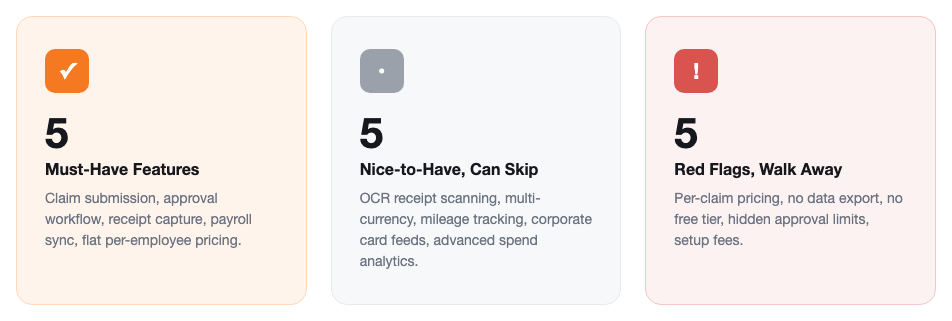
If a tool is missing any of these, it isn't really replacing email-and-spreadsheet expense tracking — it's just a form builder:
| Feature | Why It Matters | Red Flag If Missing |
|---|---|---|
| Claim submission with receipt upload | Category, amount, date, and receipt attached in one place, not an email thread | Receipts still emailed separately from the claim details |
| One-click approval workflow | Manager reviews and approves or rejects from a dashboard, with notes on rejection | Approval still happens by replying to an email or chat message |
| Automatic payroll sync | Approved claims flow into the next payroll run without re-typing amounts | Finance still manually adds reimbursements to payroll by hand |
| Complete audit trail | Every claim, approval, rejection, and payment is logged with a timestamp | No record of who approved what or when if a claim is questioned later |
| Flat, headcount-based pricing | Cost doesn't spike just because a busy travel month means more claims | A fee per claim submitted or per approval processed |
Past these five, most remaining "features" on a vendor's list are nice-to-haves, not deal-breakers — see the next section.
Nice-to-Have Features You Can Skip (For Now)
These show up on almost every expense software pricing page, and they're genuinely useful at scale — but they rarely change the outcome for a small team, and are often what pushes a plan into a higher-priced tier:
- OCR receipt scanning — useful when processing hundreds of receipts a month; a small team can type a category and amount faster than it takes to correct a misread scan
- Multi-currency support — essential for frequent international travel, irrelevant if your team expenses in one currency
- Automated mileage tracking via GPS — valuable for field sales teams logging daily trips, overkill for occasional local travel claims
- Corporate card feed integration — matters once you've issued company cards at scale; most small businesses still reimburse personal spending
- Advanced spend analytics dashboards — useful for finance teams optimizing category-level budgets at higher claim volumes, rarely the deciding factor under 25 employees
Red Flags That Mean Walk Away
- Per-claim pricing — this penalizes exactly the busy expense months the software is supposed to help with
- No data export — if you can't take your claims history with you, switching tools later means losing your own audit trail
- No free trial or free tier — you can't judge whether the approval workflow fits how your managers actually sign off without running real claims through it
- Approval limits that can't be configured — every business has different sign-off thresholds; a tool that hardcodes its own is solving a different company's problem
- Setup or implementation fees — a tool built for small teams shouldn't need a paid onboarding project before the first claim goes through
Questions to Ask Before You Buy
Save these for the sales call or the FAQ page — the answers usually reveal more than the feature list does:
- "Does the price change if claim volume doubles during a busy travel month?"
- "When a claim is approved, does it reach payroll automatically, or does finance still add it by hand?"
- "Can I export the full claims and approvals history if I decide to switch tools later?"
- "Can I set my own approval limits per manager, or are they fixed by the vendor?"
- "Is there a setup fee, or can employees submit their first claim the same day we sign up?"
Standalone Expense Tool vs. Built Into Your HR Platform
The must-have checklist above applies either way — but where the tool lives changes how much friction shows up at reimbursement time:
| Standalone Expense Tool | Built Into HR Platform | |
|---|---|---|
| After a claim is approved | Export approved claims, re-enter into payroll manually | Flows into the next payroll run automatically |
| Pricing | Separate subscription, often per claim or per user | Included in your existing HR plan |
| Employee record | Separate login from payroll and leave | Same login used for payslips, leave, and attendance |
| Best fit | Expense tracking is your only software need right now | You also need payroll, leave, or attendance |
How SnapHRM Checks These Boxes
SnapHRM's expense management covers the must-have list directly: employees submit claims with category, amount, and receipt upload from the dashboard or mobile app, managers approve or reject with one click, and approved expenses flow automatically into the next payroll cycle — no manual reimbursement calculation. Every claim, approval, and payment is logged for audit trail. Pricing is flat per employee headcount, not per claim, and it's included free for up to 5 employees. Still weighing whether to switch off a spreadsheet first? See our expense management software vs. spreadsheets comparison, or the full cost and ROI breakdown for typical pricing at different team sizes.
Try a Built-In Expense Workflow
SnapHRM includes full expense management in every plan, with a self-hosted Pro option for teams that prefer a one-time payment. Free for up to 5 employees.
Try SnapHRM FreeRelated Articles
Salary Slip Format in India: Components, Free Template & How to Generate Payslips Payroll · 8 min read Leave Policy in India 2026: Types of Leave, Rules & Free Policy Template Compliance · 10 min read Offer Letter Format in India: Free Templates & Complete Guide (2026) Recruitment · 7 min read Employee Onboarding Checklist for Indian Companies: Step-by-Step Guide (2026) HR Management · 9 min read Employee Self-Service Portal: Benefits, Cost & ROI for Small Businesses (2026) HR Management · 9 min read Applicant Tracking System (ATS): Cost, Benefits & ROI for Small Businesses (2026) Recruitment · 8 min read Biometric vs Software-Based Attendance Tracking: Which Is Better for Small Business? (2026) HR Management · 8 min read Expense Management Software: Cost & ROI for Small Businesses (2026) HR Management · 8 min read HR Analytics Software: Cost & ROI for Small Businesses (2026) HR Management · 8 min read Asset Management Software: Cost & ROI for Small Businesses (2026) HR Management · 8 min read Leave Management Software: Cost & ROI for Small Businesses (2026) HR Management · 8 min read Document Management Platforms: Cost & ROI for Small Business (2026) HR Management · 8 min read Best Payroll Software in India 2026: Top 8 Tools Compared Payroll · 15 min read Mandatory HR Policies in India 2026: Labour Code Amendments Compliance · 12 min read Best HR Software for US Businesses in 2026: Top 8 Compared HR Software · 12 min read US Labor Law Compliance Guide for Small Businesses (2026) Compliance · 15 min read Best HR Software for Singapore Businesses in 2026: Top 8 Compared HR Software · 12 min read Singapore Employment Act Guide for SMBs: Complete Overview (2026) Compliance · 14 min read Attendance Management Software: Cost & ROI for Small Businesses (2026) HR Management · 8 min read Employee Onboarding Software: Cost & ROI for Small Businesses (2026) HR Management · 8 min read Relieving Letter Format India: Free Templates & Guide (2026) HR Management · 7 min read Appointment Letter Format India: Free Template & Sample (2026) Recruitment · 8 min read Experience Letter Format India: Free Template & Sample (2026) HR Management · 7 min read Salary Certificate Format India: Free Template & Sample (2026) Payroll · 7 min read Applicant Tracking System Checklist: How to Choose the Right ATS (2026) Recruitment · 8 min read Confirmation Letter Format India: Free Template & Sample (2026) HR Management · 7 min read Expense Management Software vs. Spreadsheets (2026) HR Management · 8 min read Termination Letter Format India: Free Template & Notice Rules (2026) HR Management · 8 min read Payroll Software vs Excel: Cost, Compliance & Errors (2026) Payroll · 8 min read Leave Management Software vs. Spreadsheets (2026) HR Management · 8 min readFree HR Tools
Frequently Asked Questions
What features should a small business look for in expense management software?
What are red flags when evaluating expense management software?
Does expense management software need to sync with payroll?
Should I choose standalone expense software or one built into my HR platform?
Is a free expense management plan good enough for a small business?
What questions should I ask an expense management vendor before signing up?
Process Expenses With a Checklist-Ready Tool
Claim submission, approval, and payroll sync — all included. Free for teams up to 5 employees.