
Attendance Management Software for Small Business
Track employee clock-in/out, monitor late arrivals, manage shifts, and sync attendance with payroll — all from one platform.
Still Reconciling Attendance Manually?
Manual attendance tracking creates problems that compound every month.
Days Lost to Reconciliation
Every month, HR spends 2-3 days exporting biometric data, cross-referencing with leave records, and fixing discrepancies before payroll can run.
No Real-Time Visibility
Managers don't know who is present until they check the register or biometric portal. No way to see team availability at a glance.
Payroll Errors from Bad Data
Attendance mismatches lead to wrong salary calculations — overpaying for absent days or underpaying when records are incomplete.
What is Attendance Management Software and Why Do You Need It?
Attendance tracking is deceptively simple at first. With 5 employees, you know who showed up. With 20, you need a register. With 50, that register becomes unreliable — buddy punching, forgotten entries, and month-end reconciliation headaches become the norm.
Most Indian SMBs already have a biometric device on the wall — usually a ZKTeco fingerprint or face-recognition terminal. It captures the punch data reliably, but getting it into a format that payroll can use requires manual export, cleanup, and cross-referencing with leave records. This process alone can take 2-3 days every month.
SnapHRM attendance management software connects directly to your existing ZKTeco biometric device, so punch data flows in automatically — no daily export or spreadsheet cleanup. Employees without a device on-site can still clock in from their dashboard or mobile app. Either way, you get real-time visibility into who is present, absent, or late, and attendance data automatically syncs with leave management and payroll — so month-end processing takes minutes, not days.
Unlike standalone attendance tools, SnapHRM includes attendance as part of a complete HR platform. No need for separate integrations between your biometric hardware, leave tracker, and payroll software. Everything works together out of the box. Free for up to 5 employees. Not sure whether to go biometric or software-based for a remote or hybrid team? See our biometric vs software-based attendance comparison. Weighing the switch from a register or spreadsheet? Our attendance software cost and ROI breakdown covers typical pricing and when it pays for itself. Need to check exact overtime pay under the new labour codes? Try our overtime pay calculator for the double-rate amount. Shopping around for a tool? Our attendance management software checklist covers the must-have features and red flags to check before you buy.
Attendance Tracking That Works
Real-time attendance data that flows directly into payroll. No manual exports or reconciliation.
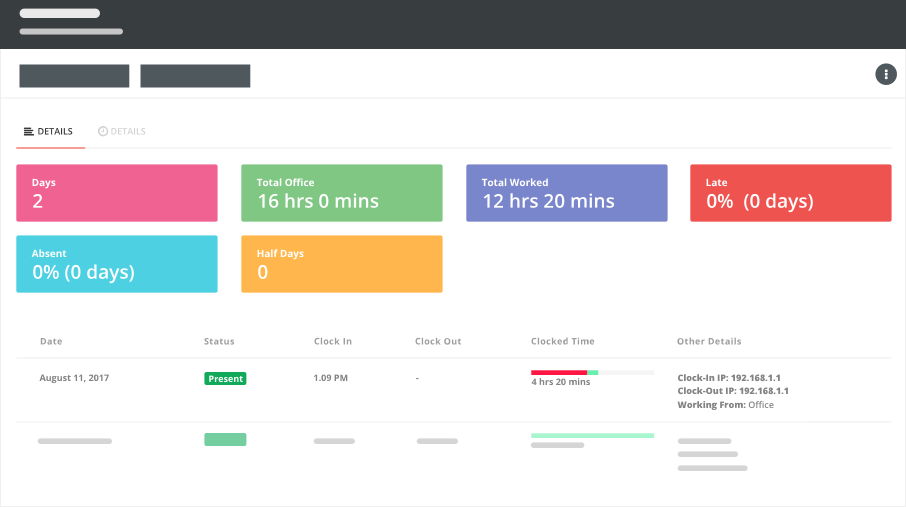
Daily Attendance Dashboard
See who is present, absent, late, or on leave — all on one screen. Filter by department, team, or location.
Clock-In/Out from Dashboard
Employees mark attendance from their browser or mobile app. No biometric device dependency for remote or hybrid teams.
Auto Payroll Sync
Attendance data flows directly into payroll. Late deductions, overtime, and absent days are calculated automatically.
How SnapHRM Attendance Tracking Works
Simple setup, automatic tracking, zero reconciliation
Define Attendance Rules
Set work hours, shift timings, grace periods for late arrivals, and overtime rules. Configure once for the whole company or per department.
Employees Clock In/Out
Employees mark attendance from their dashboard, mobile app, or a connected ZKTeco biometric device. Timestamps are recorded automatically.
Review & Process
View daily, weekly, or monthly attendance reports. Flag anomalies. When payroll runs, attendance data is already there — no export needed.
Complete Attendance Management
Everything you need to track attendance accurately — included in every plan
Clock-In/Clock-Out
Employees mark attendance from browser or mobile app. Timestamps, IP address, and device details are logged for audit.
ZKTeco Biometric Integration
Connect your existing ZKTeco fingerprint or face-recognition device. Punch data syncs into SnapHRM automatically — no manual export or file upload.
Shift Management
Create and assign shifts. Rotate shifts across teams. Track attendance against assigned shift timings automatically.
Late Arrival Tracking
Configure grace periods. Flag late arrivals automatically. Set rules for half-day deductions after repeated late marks.
Overtime Tracking
Track overtime hours beyond regular shift. Configure overtime rates and rules for automatic payroll calculations.
Attendance Reports
Daily, weekly, and monthly attendance reports. Department-wise summaries. Export to Excel for compliance or audits.
Leave & Payroll Sync
Attendance automatically reflects approved leaves. Data flows into payroll for accurate salary processing without manual entry.
More Than Just Attendance
Standalone attendance apps track clock-ins. SnapHRM connects attendance to everything else.
| What You Need | SnapHRM | Attendance-Only Tools |
|---|---|---|
| Clock-In/Clock-Out | ||
| Shift Management | ||
| Late & Overtime Tracking | ||
| Leave Integration | ||
| Payroll Integration | ||
| Employee Database | ||
| Recruiting & Onboarding | ||
| Expense Management | ||
| Document Management | ||
| Free Plan Available |
Simple, Transparent Pricing
Attendance Management is included in every plan. No per-feature charges. No surprises.
Free for up to 5 employees
Full attendance management + all HR features. No credit card required.
Paid plans for growing teams:
- Basic (10 employees) — $8/mo or ₹499/mo
- Standard (25 employees) — $24/mo or ₹1,490/mo
- Premium (50 employees) — $39/mo or ₹2,490/mo
- Enterprise (100 employees) — $59/mo or ₹3,990/mo
Related Features
Attendance Management works best with these SnapHRM features
Frequently Asked Questions
Common questions about SnapHRM attendance management
What is attendance management software?
How do employees mark attendance in SnapHRM?
Does SnapHRM integrate with biometric devices?
Does SnapHRM support ZKTeco biometric attendance machines?
Is SnapHRM attendance tracking free?
Can I track attendance for remote or hybrid teams?
Does attendance data sync with payroll automatically?
Can I manage different shifts with SnapHRM?
How does SnapHRM handle late arrivals?
Have more questions? Check our documentation or contact us.
Track Attendance Without the Headache
Free for up to 5 employees. Set up in minutes. No credit card required.