
Almost every small business starts leave tracking the same way: a shared Excel or Google Sheets file, one tab per employee or one row per request, one person keeping it updated. It works fine at first. The question is when it stops working — and whether leave management software is worth switching to before or after it does. Here's what a spreadsheet actually handles well, where it breaks down, and how to tell which stage your team is at.
How Each Approach Actually Works
Spreadsheet leave tracking means an employee messages or emails their manager to ask for time off, the manager checks a shared file to see if anyone else is already out that week, types the approval into a row, and manually subtracts the days from a running balance formula.
Leave management software replaces each of those manual handoffs with a fixed workflow: an employee applies for leave from their dashboard or mobile app, it routes automatically to their manager who sees the team's leave calendar before approving, and the balance updates itself the moment the request is approved — no formula to check, no file to update by hand.
Where a Spreadsheet Still Works
- Zero software cost — a spreadsheet is already installed, nothing to buy or set up
- Total control over layout — add a leave type or a column any time, no admin settings to find
- Fine for very small teams — with 3-4 people, one manager can usually keep the whole team's calendar in their head anyway
- No approval bottleneck if there's only one approver — a quick reply in chat can work when it's just one manager signing off
Where a Spreadsheet Breaks Down
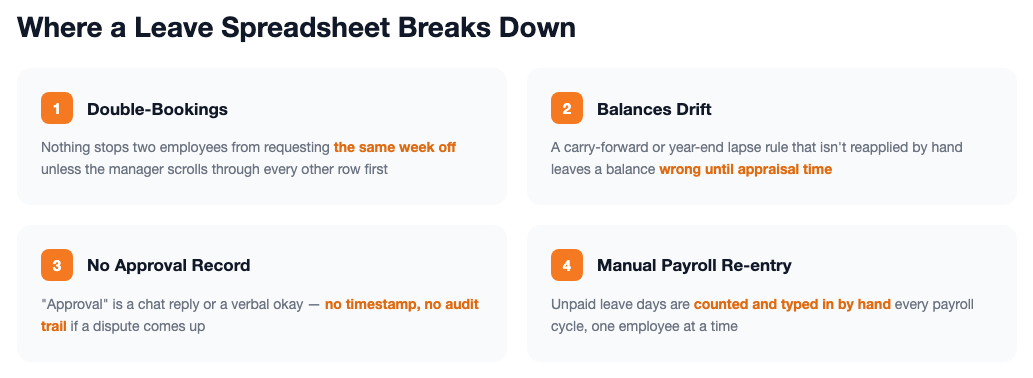
- Double-bookings go unnoticed — nothing stops two employees from requesting the same week off unless the manager happens to scroll through every other row first
- Balances drift silently — a carry-forward or year-end lapse rule that isn't re-applied by hand leaves an employee's balance wrong until someone questions it at appraisal time
- No real approval workflow — "approval" is a reply in a chat thread or a verbal okay, with no record of when or by whom
- Manual re-entry into payroll — unpaid leave days still have to be counted and typed into the payroll run by hand, which is where a miscount becomes a wrong payslip
- One file, one owner — if a second manager needs to see or approve requests for their own team, a shared spreadsheet starts producing version conflicts
Side-by-Side Comparison
| Factor | Spreadsheet | Leave Management Software |
|---|---|---|
| Upfront cost | None — already have the file | Free up to 5 employees, then a flat plan fee |
| Team leave calendar | Separate tab to check manually before approving | Visible to the manager at the moment of approval |
| Balance calculation | Manual formula, re-checked by hand each cycle | Updates automatically on approval |
| Approval workflow | Chat reply or verbal okay, no record | Routed to the manager, logged with a timestamp |
| Payroll sync | Unpaid days manually counted and re-typed | Unpaid leave days flow into the payroll run automatically |
| Multiple simultaneous approvers | Prone to version conflicts | Each manager sees only their own team's queue |
Figures above describe typical workflow differences, not a formal cost study — your own team size and leave policy will vary.
Signs It's Time to Move Off the Spreadsheet
Still fine with a spreadsheet:
The team is small enough that one manager can mentally track who's out, requests are rare, and no balance has ever been wrong at month-end.
Time to switch:
Two employees have ever been approved for the same dates, a leave balance has ever been disputed, or more than one manager now needs to see and approve requests for their own team.
How SnapHRM Replaces the Spreadsheet
SnapHRM's leave management module covers the handoffs a spreadsheet leaves manual: employees apply for leave from the dashboard or the Android/iOS app, managers see their team's leave calendar before approving with one click, and balances — including statutory types like maternity, earned, and casual leave — update automatically the moment a request is approved. Approved unpaid leave flows straight into the next payroll run, and if an employee is exiting with unused earned leave, SnapHRM's free Leave Encashment calculator checks the payout math instead of a spreadsheet formula. It's included in every plan, free for up to 5 employees, with no separate per-employee leave-tracking fee. See our leave management software cost and ROI guide for the full pricing breakdown, or our leave policy in India guide for how to set up each leave type correctly in the first place.
Retire the Leave Spreadsheet
Leave requests, approvals, and payroll sync — built in, free for up to 5 employees, with a self-hosted Pro option for teams that prefer a one-time payment.
Try SnapHRM FreeRelated Articles
Salary Slip Format in India: Components, Free Template & How to Generate Payslips Payroll · 8 min read Leave Policy in India 2026: Types of Leave, Rules & Free Policy Template Compliance · 10 min read Offer Letter Format in India: Free Templates & Complete Guide (2026) Recruitment · 7 min read Employee Onboarding Checklist for Indian Companies: Step-by-Step Guide (2026) HR Management · 9 min read Employee Self-Service Portal: Benefits, Cost & ROI for Small Businesses (2026) HR Management · 9 min read Applicant Tracking System (ATS): Cost, Benefits & ROI for Small Businesses (2026) Recruitment · 8 min read Biometric vs Software-Based Attendance Tracking: Which Is Better for Small Business? (2026) HR Management · 8 min read Expense Management Software: Cost & ROI for Small Businesses (2026) HR Management · 8 min read HR Analytics Software: Cost & ROI for Small Businesses (2026) HR Management · 8 min read Asset Management Software: Cost & ROI for Small Businesses (2026) HR Management · 8 min read Leave Management Software: Cost & ROI for Small Businesses (2026) HR Management · 8 min read Document Management Platforms: Cost & ROI for Small Business (2026) HR Management · 8 min read Best Payroll Software in India 2026: Top 8 Tools Compared Payroll · 15 min read Mandatory HR Policies in India 2026: Labour Code Amendments Compliance · 12 min read Best HR Software for US Businesses in 2026: Top 8 Compared HR Software · 12 min read US Labor Law Compliance Guide for Small Businesses (2026) Compliance · 15 min read Best HR Software for Singapore Businesses in 2026: Top 8 Compared HR Software · 12 min read Singapore Employment Act Guide for SMBs: Complete Overview (2026) Compliance · 14 min read Attendance Management Software: Cost & ROI for Small Businesses (2026) HR Management · 8 min read Employee Onboarding Software: Cost & ROI for Small Businesses (2026) HR Management · 8 min read Relieving Letter Format India: Free Templates & Guide (2026) HR Management · 7 min read Appointment Letter Format India: Free Template & Sample (2026) Recruitment · 8 min read Experience Letter Format India: Free Template & Sample (2026) HR Management · 7 min read Salary Certificate Format India: Free Template & Sample (2026) Payroll · 7 min read Applicant Tracking System Checklist: How to Choose the Right ATS (2026) Recruitment · 8 min read Confirmation Letter Format India: Free Template & Sample (2026) HR Management · 7 min read Expense Management Software vs. Spreadsheets (2026) HR Management · 8 min read Termination Letter Format India: Free Template & Notice Rules (2026) HR Management · 8 min read Payroll Software vs Excel: Cost, Compliance & Errors (2026) Payroll · 8 min read Expense Management Software Checklist: How to Choose (2026) HR Management · 8 min readFree HR Tools
Frequently Asked Questions
Can a small business just use a spreadsheet for leave tracking?
What's wrong with tracking leave in Excel?
When should a small business switch from Excel to leave management software?
Does leave management software handle statutory leave types like maternity leave?
Does leave management software replace the spreadsheet completely?
Is SnapHRM's leave management free to try instead of a spreadsheet?
Stop Reconciling Leave by Hand
Apply, approve, and track balances — synced with payroll automatically. Free for teams up to 5 employees.