
Employee Self-Service Portal
Give employees their own dashboard to manage profiles, view payslips, apply for leave, check attendance, and access company documents — without chasing HR.
Your HR Team Shouldn't Be a Help Desk
When employees can't access their own information, every small question becomes an HR ticket.
Constant HR Queries
"What is my leave balance?" "Send me last month's payslip." These routine questions consume hours of HR time every week.
No Self-Service Access
Employees can't view their own data — payslips, leave history, attendance records. Everything requires HR to look it up and share manually.
Outdated Employee Records
When employees can't update their own address, phone number, or bank details, records go stale. HR only finds out during payroll or compliance.
What is Employee Self-Service Software and Why Do You Need It?
In most small businesses, every HR request goes through one person. "What is my leave balance?" "Can I get a copy of my payslip?" "When was my last increment?" "Can you update my bank details?" Each question takes 5-10 minutes of HR's time — and when you have 20+ employees, those minutes add up to hours every week.
An employee self-service portal eliminates this back-and-forth. Employees get their own dashboard where they can view payslips, check leave balances, apply for time off, update personal information, and download documents like offer letters, salary certificates, or a relieving letter after they exit — all without involving HR.
SnapHRM gives every employee a personal dashboard from day one. Whether they are checking their payslip, applying for leave, marking attendance, or submitting an expense claim — they do it from their own portal. HR stays focused on strategic work instead of answering routine queries.
Available on web, Android, iOS, and desktop apps. Free for up to 5 employees. See the full cost and ROI breakdown to decide if it is worth it for your team size.
People search for this under a few different names — employee self-service portal, ESS system, or just employee self-service — but they all describe the same thing: software where employees handle their own routine HR tasks instead of going through a person. Adoption depends more on rollout than on features. A portal only sticks if it replaces a real daily pain point from day one (payslip requests are usually the fastest win), works on mobile without a separate login, and doesn't make employees re-enter data that is already in the system. SnapHRM auto-populates each employee's dashboard from their existing HR record, so there is no separate setup step before they can start using it.
When comparing employee self-service systems, look past the feature list to how the portal actually fits your existing HR workflow. Three things matter more than any individual feature: whether self-service is built into your core HR/payroll system or bolted on as a separate login (bolt-ons mean a second password to reset and data that drifts out of sync between the two systems), whether access is role-based so each employee sees only their own record while managers see just their team's, and whether pricing scales with headcount instead of charging extra per module. SnapHRM's self-service portal uses the same login and the same employee record as payroll, leave, and attendance — there is no separate ESS subscription to buy or integration to maintain — with role-based access control and data hosted on Microsoft Azure.
Everything Employees Need, in One Dashboard
Employees manage their own HR tasks. HR focuses on work that matters.
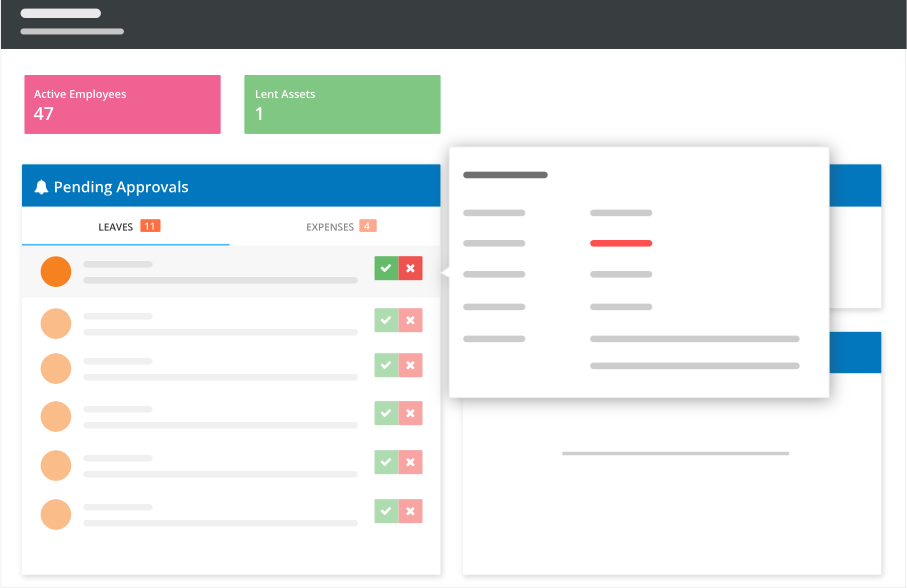
Personal Dashboard
Each employee sees their leave balance, attendance summary, recent payslips, and pending requests — all in one place.
Leave & Attendance Self-Service
Apply for leave, mark attendance, view team calendar, and check leave history. No forms to fill, no emails to send.
Payslip & Document Access
View and download payslips, offer letters, salary certificates, and company policies. Instant access, no HR involvement.
How the Self-Service Portal Works
Empower employees from day one
Employee Gets Access
When you add an employee to SnapHRM, they automatically get login credentials to their personal portal. Available on web, mobile, and desktop.
Manage Their Own HR Tasks
Employees apply for leave, mark attendance, update personal details, view payslips, submit expense claims, and access documents — all self-service.
HR Focuses on Strategy
With routine queries eliminated, your HR team can focus on hiring, culture, compliance, and employee engagement instead of being a help desk.
What Employees Can Do
A complete self-service experience included in every SnapHRM plan
Profile Management
Employees update their own personal details — address, phone, emergency contacts, bank information. Changes go to HR for approval if configured.
Payslip Access
View and download current and historical payslips. Employees understand their salary breakdown without asking HR.
Leave Application
Check leave balance, view team calendar, and apply for leave. Track application status and approval history.
Attendance Tracking
Clock in/out from the dashboard or mobile app. View attendance history, late marks, and overtime hours.
Expense Claims
Submit expense claims with receipts. Track approval status. Approved expenses flow into the next payroll cycle automatically.
Document Center
Access company documents, policies, and handbooks. Download personal documents like offer letters and salary certificates.
Manager Self-Service
Managers get their own self-service view — approve leave and expense requests, see their team's leave calendar and attendance summary — without a separate manager tool or login.
Real-Time Notifications
Employees and managers are notified the moment a leave request is approved, a payslip is generated, or a document is added — no need to log in just to check.
Self-Service Built Into Your HR System
Not a separate portal. Not an add-on. Every SnapHRM employee gets self-service access by default.
| What You Need | SnapHRM | Basic ESS Tools |
|---|---|---|
| Employee Dashboard | ||
| Profile Management | ||
| Payslip Access | ||
| Leave Application | ||
| Attendance Clock-In | ||
| Expense Claims | ||
| Document Access | ||
| Mobile & Desktop Apps | ||
| Manager Approval View | ||
| Integrated with Payroll | ||
| Free Plan Available |
Simple, Transparent Pricing
Employee Self-Service is included in every plan. No per-feature charges. No surprises.
Free for up to 5 employees
Full employee self-service + all HR features. No credit card required.
Paid plans for growing teams:
- Basic (10 employees) — $8/mo or ₹499/mo
- Standard (25 employees) — $24/mo or ₹1,490/mo
- Premium (50 employees) — $39/mo or ₹2,490/mo
- Enterprise (100 employees) — $59/mo or ₹3,990/mo
Related Features
Employee Self-Service works best with these SnapHRM features
Frequently Asked Questions
Common questions about SnapHRM employee self-service
What is an employee self-service portal?
Is the SnapHRM employee portal free?
Can employees access the portal on mobile?
What can employees see and do on their dashboard?
Can employees update their own bank details?
Does the self-service portal reduce HR workload?
Is the portal secure?
Do I need a separate ESS tool with SnapHRM?
Is an employee self-service system different from an employee self-service portal?
What makes employees actually use an employee self-service system?
Does the self-service portal include tools for managers, or just employees?
Do employees get notified when a request is approved or a payslip is ready?
What should I look for when choosing an employee self-service system?
Have more questions? Check our documentation or contact us.
Give Employees the Access They Deserve
Free for up to 5 employees. Every employee gets their own dashboard.