
Employee Asset Management Software
Track laptops, phones, ID cards, keys, and other company assets assigned to employees. Know who has what — and get it back when they leave.
Do You Know Where Your Company Assets Are?
Without proper tracking, company assets disappear — literally.
Assets Go Missing
Employees leave and no one remembers what was issued to them. Laptops, phones, and access cards are not returned because there is no record of what was assigned.
Spreadsheet Registers Are Stale
IT maintains one asset list, HR maintains another. Neither is up to date. When you need to find who has a specific laptop, it takes hours.
Exit Delays
Full-and-final settlement gets stuck because no one knows what assets need to be collected. Every exit becomes a scavenger hunt.
What is Asset Management Software and Why Do You Need It?
Every company assigns assets to employees — laptops, monitors, phones, access cards, parking passes, company vehicles. As long as you have 5-10 employees, you can keep track mentally. At 20+, assets start going missing. An employee leaves and no one remembers what was issued to them. A laptop needs repair but no one knows who has it.
Most companies track assets in a spreadsheet that is outdated within a month. IT maintains one list, HR maintains another, and neither matches reality. When an employee exits, the full-and-final settlement is delayed because no one has a definitive record of what needs to be returned.
SnapHRM asset management lets you maintain a central register of all company assets, assign them to employees, track their status, and ensure everything is returned during offboarding. When an employee's profile shows all assigned assets, the exit checklist writes itself.
Built into SnapHRM alongside payroll, leave management, and employee self-service. No separate asset tracking tool needed. Free for up to 5 employees. See the full cost and ROI breakdown to decide if it is worth it for your team size, or our asset management software vs. spreadsheets comparison for exactly where a spreadsheet register breaks down.
Every Asset, Tracked and Assigned
Assign assets to employees. Track status. Collect on exit. One system for everything.
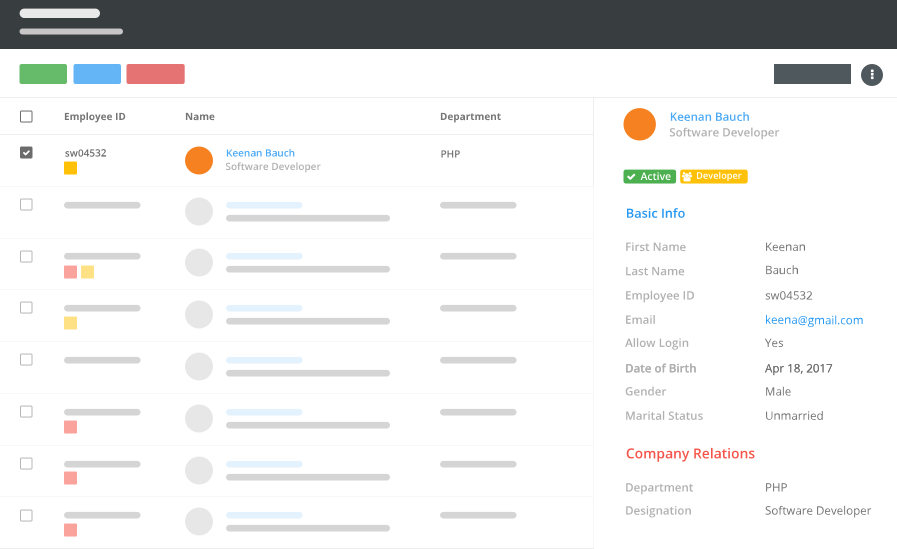
Asset Register
Maintain a central register of all company assets — name, type, serial number, purchase date, and current status.
Employee Assignment
Assign assets to specific employees with issue date and expected return date. View all assets assigned to any employee.
Return Tracking
Mark assets as returned during offboarding. The employee's exit checklist shows exactly what needs to be collected.
How SnapHRM Asset Tracking Works
Simple asset lifecycle management
Add Assets
Add company assets to the register with name, type, serial number, and purchase details. Categorize by type — laptop, phone, furniture, access card, etc.
Assign to Employees
Assign assets to employees with issue date and notes. The asset appears on the employee's profile. Both HR and the employee can see what is assigned.
Track & Recover
When an employee exits, their profile shows all assigned assets. Mark items as returned during the exit process. Nothing falls through the cracks.
Complete Asset Management
Track every company asset — included in every SnapHRM plan
Asset Register
Central register of all company assets with name, type, serial number, purchase date, warranty, and condition tracking.
Employee Assignment
Assign assets to employees with one click. Track issue date, return date, and current custodian for every asset.
Asset Categories
Organize assets by type — laptops, phones, monitors, furniture, vehicles, access cards. Filter and search by category.
Assignment History
Full history of who had each asset and when. Useful for warranty claims, repairs, and accountability tracking.
Return Management
Mark assets as returned during employee exit. Integration with exit checklist ensures nothing is missed.
Asset Reports
Reports on total assets, assigned vs available, assets by type, and assets per employee. Export to Excel for audits.
Asset Tracking Inside Your HR System
Standalone IT asset tools are built for large enterprises. SnapHRM gives you what you actually need.
| What You Need | SnapHRM | IT Asset Tools |
|---|---|---|
| Asset Register | ||
| Employee Assignment | ||
| Return Tracking | ||
| Linked to Employee Profiles | ||
| Exit Checklist Integration | ||
| Leave & Attendance | ||
| Payroll Integration | ||
| Recruiting | ||
| No Extra Subscription | ||
| Free Plan Available |
Simple, Transparent Pricing
Asset Management is included in every plan. No per-feature charges. No surprises.
Free for up to 5 employees
Full asset management + all HR features. No credit card required.
Paid plans for growing teams:
- Basic (10 employees) — $8/mo or ₹499/mo
- Standard (25 employees) — $24/mo or ₹1,490/mo
- Premium (50 employees) — $39/mo or ₹2,490/mo
- Enterprise (100 employees) — $59/mo or ₹3,990/mo
Related Features
Asset Management works best with these SnapHRM features
Frequently Asked Questions
Common questions about SnapHRM asset management
What is employee asset management software?
Is SnapHRM asset management free?
What types of assets can I track?
How does asset tracking help with employee offboarding?
Can employees see their assigned assets?
Does SnapHRM track asset history?
Do I need a separate IT asset management tool?
Can I export asset reports?
Have more questions? Check our documentation or contact us.
Know Where Every Company Asset Is
Free for up to 5 employees. Track unlimited assets.