
Employee Onboarding Software for Small Business
Turn hired candidates into productive employees from day one. Collect documents, assign assets, set up access, and create a great first impression — without the manual chaos.
Is Your Onboarding Process a Checklist on Paper?
Poor onboarding creates compliance gaps, delays productivity, and makes a bad first impression.
Documents Collected Late
ID proofs, bank details, and tax declarations are collected days or weeks after joining. Payroll can't run accurately until this paperwork is complete.
Assets Not Ready
New hire shows up and there is no laptop. Or the laptop is ready but no one remembered to create their email account or give them system access.
Bad First Impression
The employee's first week is spent chasing HR for access, filling out forms, and waiting for tools. Not the start you want for a new team member.
What is Employee Onboarding Software and Why Do You Need It?
A new hire's first day sets the tone for their entire experience at your company. At most small businesses, onboarding looks like this: the HR person scrambles to get a laptop, sends login credentials over WhatsApp, asks the employee to fill out 5 different forms, and hopes they figure out the rest. Important documents get collected weeks later — if at all.
Good onboarding is not just about paperwork. It is about making the new hire feel welcome, giving them the tools they need, and ensuring all compliance requirements are met. But without a system, critical steps get missed — bank details are not collected, assets are not assigned, and the employee starts without access to tools they need.
SnapHRM onboarding connects directly with your applicant tracking system. When you hire a candidate, you convert them into an employee with one click. Their profile is created with all candidate data carried over. From there, you collect documents, assign assets, set up their self-service portal, and add them to leave and payroll — all within the same system.
No onboarding checklist spreadsheet. No forgotten steps. Free for up to 5 employees. See the full cost and ROI breakdown to decide if it is worth it for your hiring volume. Getting the joining paperwork right matters too — see our appointment letter format guide for the mandatory clauses and a free template. Once probation ends, SnapHRM flags the date so the next step doesn't get missed — see our confirmation letter format guide for what it should include and when to issue it.
Onboarding That Works from Day One
From hired candidate to fully set up employee — one seamless flow.
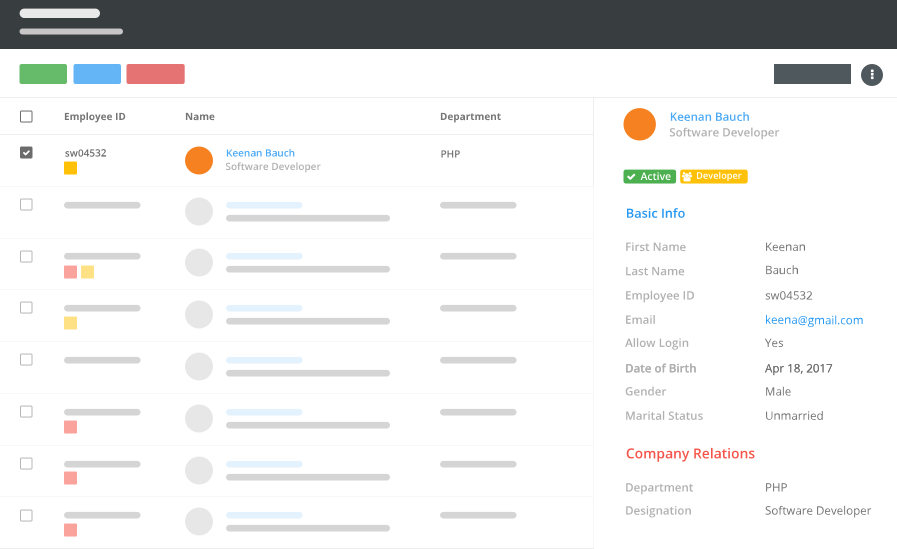
Candidate-to-Employee Conversion
Hired candidate becomes an employee with one click. All application data — name, contact, resume — carries over automatically.
Document Collection
Collect ID proofs, bank details, tax declarations, and joining documents. Track what has been submitted and what is pending.
Asset & Access Setup
Assign laptop, phone, access card, and other equipment. Set up their self-service portal, leave allocation, and payroll details.
How SnapHRM Onboarding Works
Seamless flow from hiring to productive employee
Convert Candidate to Employee
Accept a candidate from the ATS pipeline. Click convert. Their profile is created with all candidate data — no re-entry needed.
Collect Documents & Assign Assets
Upload joining documents, assign company assets, configure leave allocation, and set up payroll details. Track completion for each item.
Employee Is Ready
The new hire logs into their self-service portal on day one. They can view their profile, check leave balance, mark attendance, and access company documents.
Complete Onboarding Experience
Set up new hires properly — every time, every employee
Candidate Conversion
Convert hired candidates from the ATS into employee records with one click. All data carries over — personal details, resume, interview notes.
Joining Checklist
Define onboarding items — document submission, asset assignment, policy acknowledgment, team introduction. Track completion status.
Document Collection
Collect ID proofs, bank details, PAN, Aadhaar, tax declarations, and custom documents. Upload and categorize per employee.
Asset Assignment
Assign laptop, phone, access card, and other equipment to the new hire. Assets show on their profile for easy tracking.
Leave & Payroll Setup
Configure leave allocation (pro-rated for mid-year joins), salary components, and payroll details during onboarding.
Portal Access
New hire gets login credentials to their self-service portal. Available on web, mobile, and desktop from day one.
Onboarding That Connects to Everything
Standalone onboarding checklists don't connect to payroll, leave, or assets. SnapHRM does.
| What You Need | SnapHRM | Onboarding Checklists |
|---|---|---|
| Employee Profile Creation | ||
| Document Collection | ||
| Onboarding Checklist | ||
| ATS Integration | ||
| Asset Assignment | ||
| Leave & Payroll Setup | ||
| Self-Service Portal | ||
| Attendance Tracking | ||
| No Extra Subscription | ||
| Free Plan Available |
Simple, Transparent Pricing
Employee Onboarding is included in every plan. No per-feature charges. No surprises.
Free for up to 5 employees
Full employee onboarding + all HR features. No credit card required.
Paid plans for growing teams:
- Basic (10 employees) — $8/mo or ₹499/mo
- Standard (25 employees) — $24/mo or ₹1,490/mo
- Premium (50 employees) — $39/mo or ₹2,490/mo
- Enterprise (100 employees) — $59/mo or ₹3,990/mo
Related Features
Employee Onboarding works best with these SnapHRM features
Frequently Asked Questions
Common questions about SnapHRM employee onboarding
What is employee onboarding software?
Is SnapHRM onboarding free?
Can I convert a hired candidate directly into an employee?
What documents can I collect during onboarding?
Can I assign assets during onboarding?
Does SnapHRM handle pro-rated leave for mid-year joins?
What does the new hire see on day one?
Do I need a separate onboarding tool with SnapHRM?
Have more questions? Check our documentation or contact us.
Make Every First Day a Great One
Free for up to 5 employees. Complete onboarding included.