
Expense Management Software for Small Business
Employees submit expense claims with receipts. Managers approve. Approved expenses flow directly into payroll. No spreadsheets, no manual calculations.
Still Managing Expenses Over Email?
Manual expense tracking creates delays, errors, and frustrated employees.
Claims Lost in Email
Employees email receipts and expense details. They get buried in the inbox. Claims are missed or delayed for weeks.
Payroll Reimbursement Errors
Manual calculation of reimbursements leads to wrong amounts in payroll. Finance has no single source of truth for approved expenses.
Slow Approvals
Without a proper workflow, expense claims sit waiting for approval. Employees get frustrated when reimbursement takes 30+ days.
What is Expense Management Software and Why Do You Need It?
Expense management at most small businesses looks like this: an employee pays for a business expense, keeps the receipt, emails it to their manager or HR, and then waits days or weeks for reimbursement. The receipt gets lost in email. The approval gets delayed. And at month-end, finance has to manually calculate reimbursements and add them to payroll.
This process is tolerable with 5 employees submitting occasional expenses. At 20+, it becomes a recurring source of errors — wrong reimbursement amounts, missed claims, delayed payments, and employees who stop submitting expenses because the process is too painful.
SnapHRM expense management software gives employees a simple interface to submit claims with receipt uploads. Managers approve or reject with one click. Approved expenses automatically flow into the next payroll cycle — no manual calculation needed. You get a complete audit trail of every claim, approval, and payment.
Unlike standalone expense tools, SnapHRM includes expense management as part of a complete HR platform. No separate subscription, no integration headaches. Free for up to 5 employees. See the full cost and ROI breakdown to decide if it is worth it for your team size, read expense management software vs. spreadsheets if you are still tracking claims in Excel and want to see exactly where that breaks down, or check our expense management software checklist for the must-have features and red flags to watch for before you buy.
Expense Claims That Process Themselves
Submit, approve, reimburse — automatically synced with payroll.
Easy Claim Submission
Employees submit expenses with category, amount, date, and receipt upload. Simple form — takes less than a minute.
One-Click Approvals
Managers see pending claims on their dashboard. Approve or reject with one click. Add notes for rejected claims.
Auto Payroll Integration
Approved expenses are automatically added to the next payroll cycle. No manual data entry between expense system and payroll.
How SnapHRM Expense Management Works
From submission to reimbursement in three steps
Employee Submits Claim
Employee logs the expense — category, amount, date, and receipt upload. Submit from dashboard or mobile app.
Manager Reviews & Approves
Manager gets notified. Review the claim details and receipt. Approve or reject with one click. Rejected claims go back with feedback.
Auto-Reimburse in Payroll
Approved expenses are automatically included in the next payroll run. Employee sees the reimbursement on their payslip.
Complete Expense Management
Every expense feature included in every plan
Claim Submission
Employees submit expenses with category, amount, date, description, and receipt upload. Multiple claims can be submitted at once.
Approval Workflow
Claims go to the designated approver. Multi-level approvals can be configured. Managers approve or reject from dashboard or mobile app.
Receipt Upload
Attach receipt photos or scanned copies to every claim. All receipts are stored for audit trail and compliance.
Expense Categories
Define custom expense categories — travel, meals, office supplies, client entertainment. Track spending by category across the company.
Payroll Integration
Approved expenses are automatically added to the next payroll cycle. No manual calculation or separate reimbursement process.
Expense Reports
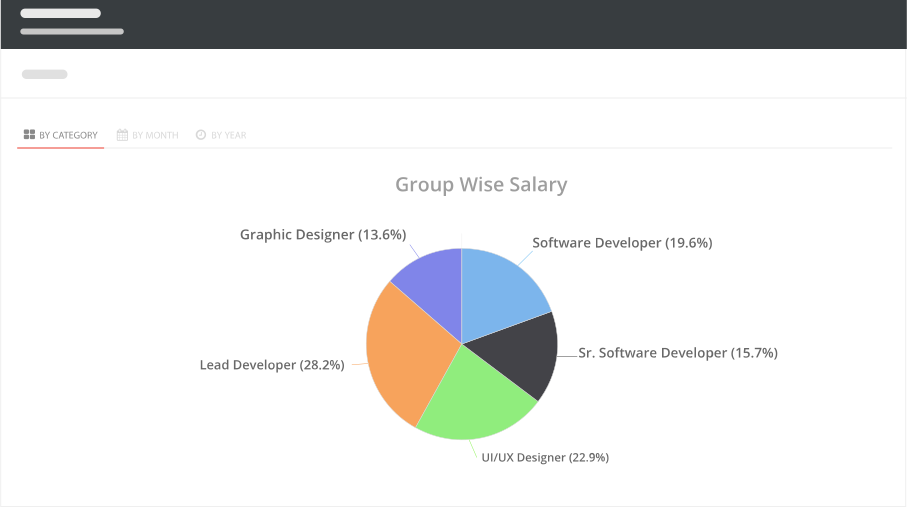
View expense summaries by employee, department, category, or period. Export reports to Excel for finance review or audits.
Expenses Built Into Your HR System
Standalone expense tools need to integrate with your payroll. SnapHRM connects them natively.
| What You Need | SnapHRM | Expense-Only Tools |
|---|---|---|
| Expense Claim Submission | ||
| Approval Workflow | ||
| Receipt Upload | ||
| Payroll Integration | ||
| Employee Database | ||
| Leave & Attendance | ||
| Recruiting | ||
| Document Management | ||
| No Extra Subscription | ||
| Free Plan Available |
Simple, Transparent Pricing
Expense Management is included in every plan. No per-feature charges. No surprises.
Free for up to 5 employees
Full expense management + all HR features. No credit card required.
Paid plans for growing teams:
- Basic (10 employees) — $8/mo or ₹499/mo
- Standard (25 employees) — $24/mo or ₹1,490/mo
- Premium (50 employees) — $39/mo or ₹2,490/mo
- Enterprise (100 employees) — $59/mo or ₹3,990/mo
Related Features
Expense Management works best with these SnapHRM features
Frequently Asked Questions
Common questions about SnapHRM expense management
What is expense management software?
Is SnapHRM expense management free?
How do employees submit expense claims?
Do approved expenses automatically go into payroll?
Can I set spending limits or policies?
Can employees submit expenses from their phone?
Does SnapHRM generate expense reports?
Do I need a separate expense tool with SnapHRM?
Have more questions? Check our documentation or contact us.
Automate Expense Reimbursements
Free for up to 5 employees. Expenses included in every plan.